5 Smart Questions to Ask Your MSP About Their Own Security
5 Smart Questions to Ask Your MSP About Their Own Security
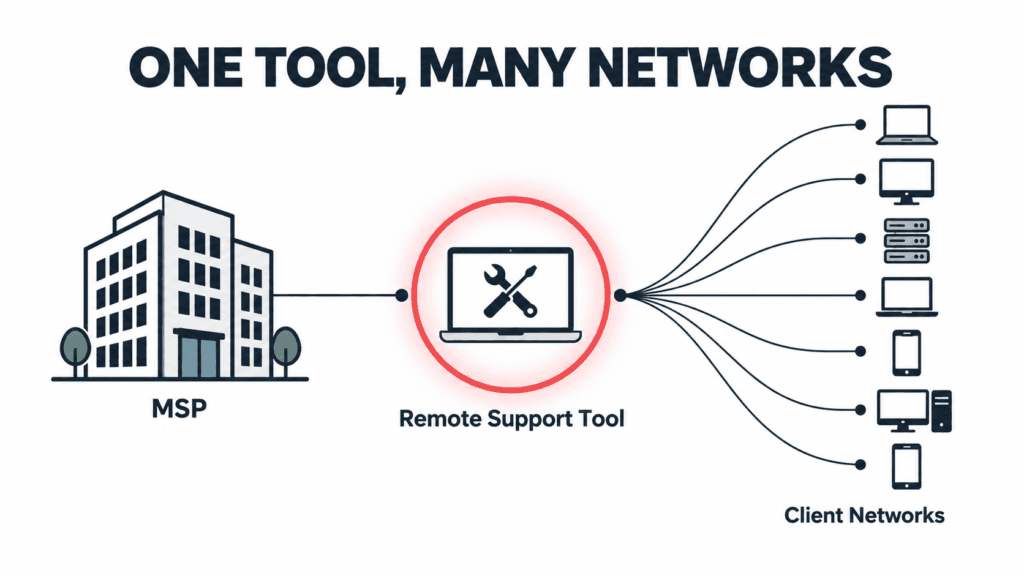
The most useful questions to ask your MSP right now have nothing to do with your own network. They are about the tools your provider uses to reach into it.
On September 11, 2026, the U.S. Cybersecurity and Infrastructure Security Agency added a critical ConnectWise ScreenConnect vulnerability to its Known Exploited Vulnerabilities catalog after confirming that attackers were already using it in real attacks. ScreenConnect is one of the most widely used remote support platforms in the managed services industry, which means the story is not really about one product. It is about a category of tools that sit at the center of how nearly every managed IT provider reaches into a client’s network.
For a small or mid-sized business, the useful takeaway is not which specific vulnerability appeared this week. It is a short set of questions to ask your MSP so you understand how they secure the tools they use to reach you.
What Actually Happened With ScreenConnect?
The flaw, tracked as CVE-2026-84869, is an improper privilege management and missing authorization issue. In practical terms, it could allow an attacker to transfer files to a device and execute them during an active remote support session without the host user ever approving the action. CISA set a remediation deadline of September 14, 2026, for federal agencies covered by Binding Operational Directive 26-04, and the same urgency applies to any organization running the affected version.
5 Smart Questions to Ask Your MSP About Their Own Security 8
The specific patch was straightforward for providers who noticed. The harder question sits one level up: how confident is your provider in their ability to spot, patch, and respond to something like this on their own infrastructure, not just on yours?
Why This Matters for Small Businesses?
Managed service providers are built on trust and access. A single provider often holds administrative reach into dozens or hundreds of client environments using remote support tools, remote monitoring platforms, and centralized password vaults. That concentration of access is efficient for delivery, and it is also exactly why attackers have been aiming at the provider layer rather than at each client individually.
According to the Huntress 2026 Cyber Threat Report, abuse of remote monitoring and management tools now accounts for 24% of all observed incidents, up from 7% the year before. Huntress’s own analysis flagged ScreenConnect specifically, including one case where a rogue install sat quietly for five months before an attacker used it as an entry point. The ScreenConnect entry in the KEV catalog is not an isolated event. It is the latest example of a documented, ongoing trend, and it is why the cybersecurity posture of your provider now matters as much as your own, which is exactly why the questions to ask your MSP have shifted this year.
5 Smart Questions to Ask Your MSP About Their Own Security 9
5 Questions to Ask Your MSP
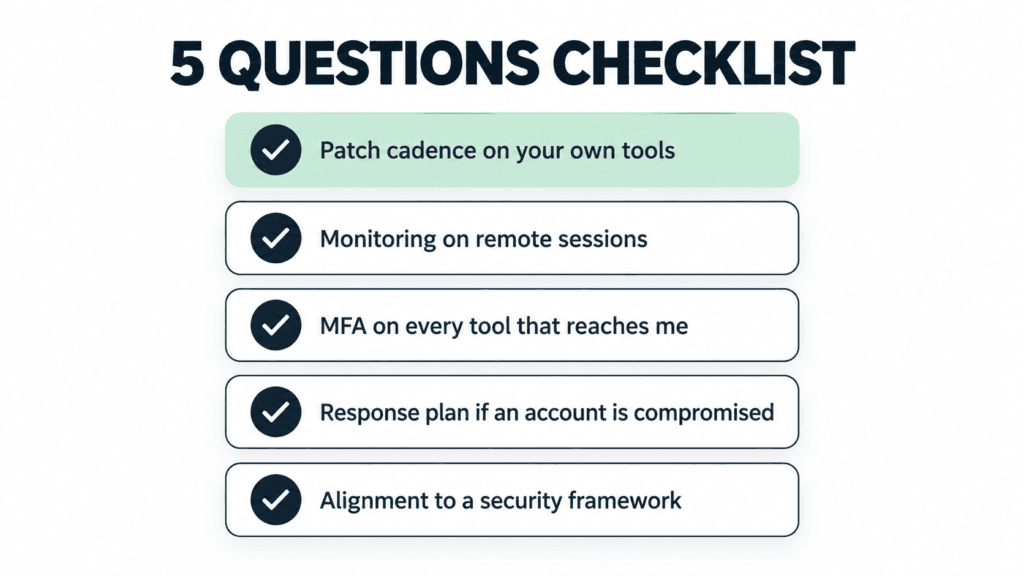
If you already have a managed IT provider, or you are evaluating one, these are the questions to ask your MSP directly. Good providers will have clear, unrehearsed answers.
1. How quickly do you patch the tools you use to reach my network?
Ask about their patch cadence for their own infrastructure, not just yours. A provider running weekly patch cycles internally is in a very different position than one that treats their tools as “set and forget.” Our September Patch Tuesday breakdown shows how quickly critical fixes can pile up in a single month.
2. What monitoring do you have on your own remote sessions?
Session logging, anomaly detection, and alerting on unusual remote access patterns should all exist on the provider side. If they cannot describe what triggers an alert on their own systems, that is a signal worth paying attention to.
3. Do you enforce multi-factor authentication on every tool that reaches my environment?
Every account, every technician, every tool. Not “we use MFA on email.” MFA on the remote support platform, on the RMM console, on the password vault, and on any cloud dashboard that touches client data. Enterprise-grade password managers make this practical to enforce at scale.
4. What is your response plan if one of your own accounts is compromised?
The right answer is not “that would not happen.” The right answer is a specific set of steps: session revocation, credential rotation, client notification timelines, and a documented containment playbook. This should also connect back to whatever cybersecurity insurance obligations exist on either side.
5. Are you aligned to a recognized security framework internally, not just for compliance reporting?
Frameworks like the NIST Cybersecurity Framework 2.0 and the CIS Controls exist for exactly this reason. A provider who applies these internally, not only when a client asks about compliance, is thinking about their own posture the same way they think about yours.
5 Smart Questions to Ask Your MSP About Their Own Security 10
What to Do Next?
If you already have a managed IT provider, send these five questions in a short message and see how they respond. The quality of the answer matters as much as the content: unrehearsed and specific beats polished and vague every time.
If you are weighing options, bring these questions to ask your MSP into the conversation before you sign anything. A provider who treats these questions as reasonable and expected is showing you how they operate. One who deflects is also telling you something.
At Pexo, security posture starts with the tools we use before it reaches the networks we protect. If you are evaluating your options, our managed IT services team is happy to walk you through exactly how we answer each of these questions for our own environment.
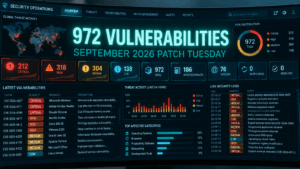
Microsoft’s September 2026 Patch Tuesday just set a record. CrowdStrike’s analysis of the release counted 972 patched vulnerabilities, more than double August’s count, and 113 of them rated Critical. Two are already being used in real attacks. If your business runs Windows anywhere, on a server, a laptop, or through a VPN, this month’s update deserves more attention than the usual “we’ll get to it”. Inside the September 2026 Patch Tuesday Release This September 2026 Patch Tuesday release patched 972 vulnerabilities in a single cycle, more than double the roughly 415 CVEs Microsoft fixed the month before, the largest release Microsoft has shipped to date. Of those, 113 carry a Critical severity rating, and two are already confirmed to be actively exploited before most businesses had a chance to patch. The volume matters less than the mix: real client-side risk in Office and Outlook, server-side risk in DNS, DHCP, and Netlogon, and infrastructure risk in Hyper-V and VPN services, all landing in the same release window. Two Vulnerabilities Are Already Being Exploited Microsoft confirmed active exploitation of two flaws before most businesses had even applied the patch. CVE-2026-81963 sits in the Windows Update Stack. CVE-2026-85880 sits in a core Windows communication component called ALPC. Both let an attacker who already has a foothold on a device, through a phishing email, a compromised browser, or stolen credentials, jump straight to full SYSTEM control. No extra clicks, no extra warnings. This is the step that turns “someone opened the wrong email” into “the attacker owns the machine.” A Dozen Office Vulnerabilities Need No Click at All Twelve of this month’s Critical fixes affect Outlook, Word, Excel, and PowerPoint, and they share a dangerous trait. Exploitation happens the moment a file is previewed, not opened. If Outlook’s Reading Pane or Windows’ Preview Pane is switched on, which it is by default on most machines, simply receiving a malicious email or having a crafted file land in a shared folder can be enough to run code on the device. CVE-2026-78509 (Outlook) and CVE-2026-78510 (Word) both score a full 9.8 out of 10 and fall into this category. No attachment to open. No macro to approve. No click required. Core Business Infrastructure Was Also Exposed This wasn’t only a desktop software patch cycle. Critical, unauthenticated remote code execution flaws landed in DNS Server, DHCP Server, Netlogon, and Kerberos, the services that handle domain logins, network addressing, and authentication for any business running Windows Server and Active Directory. Hyper-V and the built in SSTP VPN service were also patched for flaws that let an attacker escape a virtual machine or breach an internet facing VPN gateway directly. Left unpatched on exposed infrastructure, any one of these is a realistic path to a full network compromise, not just a single device. The Patching Doesn’t Stop at Microsoft’s Fix Roughly two hours after this month’s patches went out, a security researcher published a new proof of concept targeting Microsoft Defender itself, claiming an earlier fix was incomplete. There is no patch available for it yet. It’s a reminder that a Patch Tuesday release isn’t the finish line for a given month’s risk. It’s the starting point for what still needs watching. What This Means Without a Dedicated IT Team? A record setting patch release is exactly the kind of month where “we’ll update everything next time we’re in the office” gets expensive. Two of these flaws are already being exploited, and a handful more are one proof of concept away from the same fate. This is the gap that managed IT and cybersecurity support exists to close, especially in a month like this September 2026 Patch Tuesday release. Patches get assessed, prioritized by real risk instead of by however Windows Update happens to sort them, and applied on a schedule that doesn’t depend on someone remembering to click Update between meetings. Table of Content 1 Inside the September 2026 Patch Tuesday Release 2 Two Vulnerabilities Are Already Being Exploited 3 A Dozen Office Vulnerabilities Need No Click at All 4 Core Business Infrastructure Was Also Exposed 5 The Patching Doesn’t Stop at Microsoft’s Fix 6 What This Means Without a Dedicated IT Team?
In today’s fast-paced digital landscape… This raises an important question for growing businesses: what is a managed service provider, and how can partnering with one help? However, managing and maintaining complex IT infrastructure can be a daunting task, especially for small to medium-sized enterprises (SMEs) with limited resources and expertise. This is where Managed Service Providers (MSPs) step in to offer comprehensive IT solutions and support tailored to the specific needs of businesses. What Is a Managed Service Provider? At its core, an MSP is a third-party company that proactively manages and assumes responsibility for providing a defined set of IT services to its clients, typically on a subscription basis. These services can encompass a wide range of IT functions, including network and infrastructure management, cybersecurity, cloud computing, data backup and recovery, software deployment and updates, help desk support, and more. How can an organization benefit from MSP? One of the key advantages of partnering with an MSP is cost-effectiveness. Instead of hiring and maintaining an in-house IT team, which can be prohibitively expensive for many businesses, outsourcing IT functions to an MSP allows organizations to access a team of skilled professionals at a fraction of the cost, a trend industry research confirms is accelerating as more businesses shift toward managed services. Moreover, MSPs operate on a predictable monthly pricing model, making it easier for businesses to budget and plan their IT expenses. Beyond cost savings, MSPs also bring a wealth of expertise and experience to the table. By leveraging the latest technologies and best practices, MSPs can help businesses optimize their IT infrastructure for maximum efficiency, reliability, and security. This proactive approach not only minimizes downtime and reduces the risk of cyber threats but also empowers businesses to focus on their core objectives without being bogged down by IT-related issues. Furthermore, partnering with an MSP enables businesses to scale their IT resources according to their evolving needs. Whether it’s expanding into new markets, onboarding additional employees, or adopting new technologies, MSPs provide the flexibility and scalability required to support business growth seamlessly. In addition to proactive maintenance and support, MSPs also play a crucial role in ensuring regulatory compliance and data security. With the increasing threat of cyber attacks and data breaches, businesses must prioritize cybersecurity measures to safeguard sensitive information and protect their reputation. MSPs employ advanced security solutions, such as firewalls, antivirus software, intrusion detection systems, and encryption protocols, to mitigate risks and keep data safe from unauthorized access. Digital changes in businesses As businesses continue to embrace digital transformation, the demand for reliable and efficient IT services has never been higher. Whether you’re a small startup or a large enterprise, partnering with a trusted MSP can provide the technical expertise, resources, and peace of mind needed to stay ahead in today’s competitive landscape. Is an MSP Right for Your Business? If your team spends more time firefighting IT issues than growing the business, that’s usually the clearest sign a managed service provider is worth exploring. Most SMBs find the switch pays for itself through reduced downtime alone, before even counting the security and compliance benefits a good MSP brings to the table. What Does an MSP in GTA Look Like? If you’re based in the Greater Toronto Area (GTA) and looking for a reputable managed service provider to support your IT needs, look no further than Pexo. With years of experience and a proven track record of delivering exceptional IT solutions, Pexo is committed to helping businesses thrive in the digital age. From proactive monitoring and maintenance to 24/7 support and strategic consulting, our managed IT services offer a comprehensive suite designed to meet the unique needs of your organization. Don’t let IT challenges hold your business back. Contact Pexo today to learn how we can empower your organization with reliable, cost-effective IT solutions. Together, let’s unlock your full potential and drive success in the digital era. Table of Content 1 What Is a Managed Service Provider? 2 How can an organization benefit from MSP? 3 Digital changes in businesses 4 Is an MSP Right for Your Business? 5 What Does an MSP in GTA Look Like?
Consider this: In our modern, always-connected business world, downtime rarely waits for a convenient time frame. Systems can crash late at night, security risks can be discovered over the weekend, and staff might need assistance after hours. This is the reason organizations choose to invest in IT support 24×7; a service that promises IT assistance around the clock. But the notion of 24/7 support is not always what it seems. Some of the providers include full 24/7 support, whereas others do provide some limited after-hours assistance. Be very clear on what is (and is not) included before selecting a provider. What Exactly Does 24/7 IT Support Mean? Essentially, 24/7 IT support means that there is someone in your service provider who is available to answer, evaluate, and resolve technical issues, regardless of the time of day or night. It does not also mean every issue is going to get fixed right away. Instead, most providers, use a system of triaging problems based on urgency and severity. Real 24/7 support model, should include a helpdesk team, monitoring, escalation and SLA. These features guarantee that critical matters are resolved on a priority basis while less critical problems are scheduled wherever appropriate. What Is 24/7 IT Support Included In Despite the differences in service packages, trustworthy providers provide a few functionalities as part of a 4 standard service package to ensure system stability and business continuity. Round-the-Clock Helpdesk Access One of its advantages is its round-the-clock availability of IT professionals. Support channels here would consist of phone, email, ticketing portals, and live chat. This allows employees to report any issues now of the incident, without the need to wait until business hours. Ticket Management and Incident Tracking When a problem is reported, it is entered into a system that allows for tracking the issue from start until it is resolved. This serves to hold people accountable, to be transparent, and provide users the updates as when they would like to receive it. Priority-Based Response Times Support providers categorize issues based on their level of severity. Business-critical outages are resolved immediately while low priority issues are resolved as per the stipulated timelines. Remote Troubleshooting and Resolution Most IT problems can be fixed remotely, allowing the time to quickly diagnose problems without making a trip to the site. Monitoring and Alert Management A common component of an IT disaster recovery plan is the 24/7 monitoring of servers, networks, and applications. It allows IT teams to respond before these disruptions ever happen; these systems find potential problems in their infancy. Escalation to Specialized Teams Any problem that needs specialist work is passed on to senior level engineers who can solve more complex technical problems quicker.’ What’s Usually NOT Included However, contrary to the name there are some services that do not come under the title of 24/7 IT support. Knowing what is not covered can help avoid surprise expenses or confusion. Immediate Onsite Support Most providers prioritize remote resolution. In-person visits are usually booked differently or as an ancillary offer. Large IT Projects Projects, such as significant upgrades, migrations, or system implementations are generally considered project work and billed separately. Third-Party Software Support If something goes wrong involving an external vendor, you can expect your providers to help with troubleshooting, but they often cannot control the response time or the fix from the vendor side. Hardware Replacement Support teams might identify hardware issues but they will not replace them unless another contract made or a warranty is still in play. Non-Managed Systems Outside of the agreed upon service scope, devices or software are typically not supported. Why Clear Service Agreements Matter A good service level agreement is vital, so you know exactly what your provider delivers. It should also include target response times, escalation procedures, operating hours, and exclusions. In this situation, organizations tend to believe that they have complete coverage, only to find out later that there are only partial support through an implicit acceptance of risk. Boost Efficiency with Pexo IT Consulting’s Managed IT Services For organizations seeking a reliable, flexible IT solution, Pexo IT Consulting provides everything needed to meet the contemporary demands of business. A dedicated support team that is responsible for the crucial monitoring, issue identification and the resolution of incidents, and other scalable IT services to reduce downtime and increase operational efficiency. Reasons to Invest in Authentic 24/7 IT Support Those organizations that opt for extensive support services take advantage of the following: Caveat: Business Leaders Are Probably Justified In Not Having This Feature On Their Radar These advantages make 24/7 support a great reward, especially if your business is largely dependent on digital infrastructure. Answers to these questions can clarify your expectations versus what they are able to deliver. Conclusion 24X7 IT Support is crucial for the smooth functioning of the business and protection of vital systems. But you don’t get the same support from every provider. Most are vague and include access to helpdesk, monitoring and escalation process whilst leaving out onsite, big project and hardware replacement unless you state otherwise. Taking care in reviewing service agreements and clarifying exactly what is (and is not) included allows businesses to select a provider that accurately represents their operational requirements. FAQs Table of Content 1 What Exactly Does 24/7 IT Support Mean? 2 What Is 24/7 IT Support Included In 2.1 Round-the-Clock Helpdesk Access 2.2 Ticket Management and Incident Tracking 2.3 Priority-Based Response Times 2.4 Remote Troubleshooting and Resolution 2.5 Monitoring and Alert Management 2.6 Escalation to Specialized Teams 3 What’s Usually NOT Included 3.1 Immediate Onsite Support 3.2 Large IT Projects 3.3 Third-Party Software Support 3.4 Hardware Replacement 3.5 Non-Managed Systems 4 Why Clear Service Agreements Matter 5 Boost Efficiency with Pexo IT Consulting’s Managed IT Services 6 Reasons to Invest in Authentic 24/7 IT Support 7 Caveat: Business Leaders Are Probably Justified In Not Having This Feature On Their Radar 8 Conclusion 9 FAQs
Monil Saheba, Pexo's CEO, shapes business resilience through technology. He leads teams redefining IT with strategic support and cybersecurity, empowering organizations to harness technology for innovation and success.