Data Backup: Definition, Types, and Benefits

In present day digital world, one of the most valuable assets for both individuals and businesses is data. Right from personal files to important business data, losing data can cause serious consequences. This is where data backup plays an important role. It acts like a safety net, making sure your information is always protected and easily recoverable.

Data Backup: What Is It?

Data backup is a process of creating copies of vital digital data and maintaining them in a different, safe location. When actual data is lost, compromised or is corrupted because of any unforeseen situations, these copies can be used for restoration.

Documents, photos, software files, and entire systems can all be included in backup data. Ensuring business continuity and preventing irreversible data loss are the primary objectives.

Why It Is Important To Have Data Backup?

Data loss can happen anytime and for several reasons. Hardware failures, human errors, malware attacks and environmental disasters are most common causes. Without a backup, recovering lost data is very difficult or sometimes impossible.

A proper data backup plan make sure that organizations and individuals can rapidly recover their data and continue operations without major disturbances. It is fundamental part of any data protection and disaster recovery plan.

Types Of Data Backup
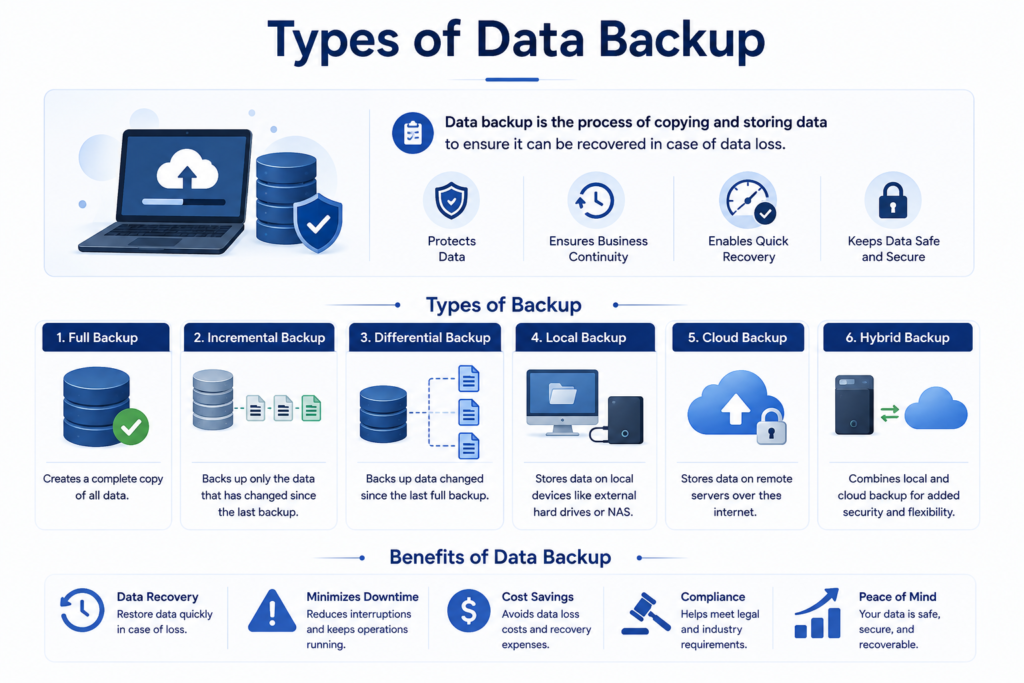
There are many kinds of data backup, but the most commonly used ones are:

Full backup

A full backup includes copying all data from a system and storing it in a backup location.

Benefits

  • Complete [protection of data
  • Fast process of recovery

Drawbacks

  • Needs more space for storage
  • Takes long to perform

This kind is mainly done periodically as a base backup.

Incremental backup

This kind of backup stores only the data that has undergone change since the last backup.

Benefits

  • Helps in saving storage space
  • Fast backup process

Drawbacks

  • Recovery can be slow as various backup sets are required.
  • It is good for businesses that requires backups in frequent basis.

Differential backup

Differential backup saves all alterations made since the last complete backup.

Benefits

  • Fast recovery as compared to incremental backups
  • Balanced usage of storage

Drawbacks

  • Needs more storage than incremental backups over time
  • This kind provides a balance between speed and storage effectiveness

Local backup

Local backup mainly includes data storage on physical devices like external hard drives or any servers within the organizations.

Benefits

  • Rapid access and recovery
  • Complete control over data

Drawbacks

  • Susceptible to physical damage or theft

Cloud backup

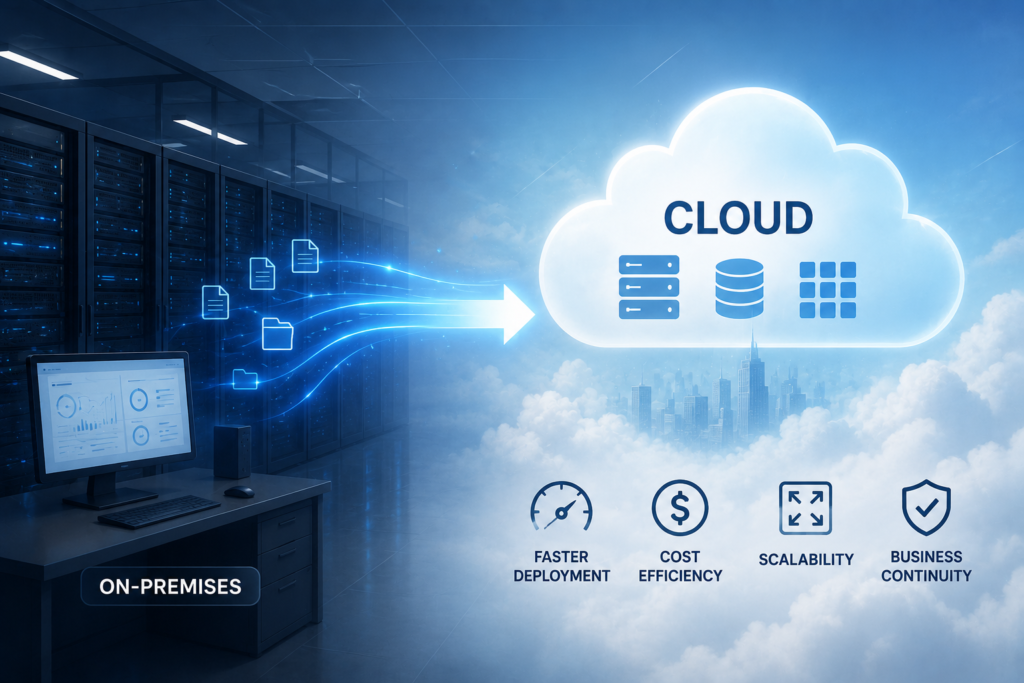
Cloud backup stores data on remote servers accessed through internet.

Benefits

  • Easy to access from anywhere
  • Protection against all physical disasters
  • Measurable storage

Drawbacks

  • Relies on internet connectivity
  • Consistent cost of subscriptions

Hybrid backup

Hybrid backup mixes both local and cloud backups

Benefits

  • Increased safety
  • Fast recovery with local copy
  • Offsite protection through cloud

Drawbacks

More complicated for managing

Advantages Of Data Backup

Executing a strong backup strategy provides many important advantages

Protection against loss of data

The main benefit of data backup is protection against loss of data caused by system failures, accidental deletion and cyberattacks.

Business continuation

Backups makes sure that businesses can continue functioning even after unexpected disturbances. Data can be restored fast, lessening downtime and loss.

Recovering from cyber threats

With the rise of ransomware and cyber-attacks, backups offers a dependable way for restoring data without paying for recovery or losing important information.

Cost savings

Recovering lost data without backups becomes expensive and also time consuming. Backups decreases the requirement for expensive data recovery services and prohibits loss of revenue.

Compliance and legal needs

Several industries needs organizations for maintaining safe backups for compliance with regulations. Proper backup system assists in meeting legal obligations.

Protection from human mistakes

Mistakes like accidental deletion or overwriting files are very common. Backups facilitates users for recovering from previous versions easily.

Recovery from disaster

Natural disasters such as floods, fires or any power failures can cause damage to physical systems. Backup solutions mainly cloud based make sure data stays safe and easily recoverable.

Protect Your Business Data with Pexo’s Advanced Backup Solutions

To keep your data secure and always accessible, it is important to rely on trusted solutions like Pexo’s data backup and disaster recovery services. These services help protect critical information from unexpected loss, cyber threats, and system failures while ensuring quick recovery and smooth business continuity with minimal disruption.

Conclusion

Backing up data is an important part of modern data management and security, not just a technical need. You can keep your personal and professional lives running smoothly by making secure copies of your data.

If you know a lot about the different kinds of data backups and what they can do for you, you can choose the best one for your needs. No matter how big or small your business is, you need to invest in a reliable backup solution to ensure long-term success and peace of mind.
FAQS

What is the primary purpose of data backup?

The primary purpose is protection of data and enabling recovery in case of loss, damages or cyberattacks

Which kind of backup is best?

There is no single best backup, A combination of complete, incremental and cloud backups is often most efficient.

How frequently data should be backed up?

It relies on how often your data changes, but daily or consistent backups are recommended for important data.

Is cloud back up safe?

Yes, most of the cloud backup solutions make use of encryption and latest safety measures for protection of data.

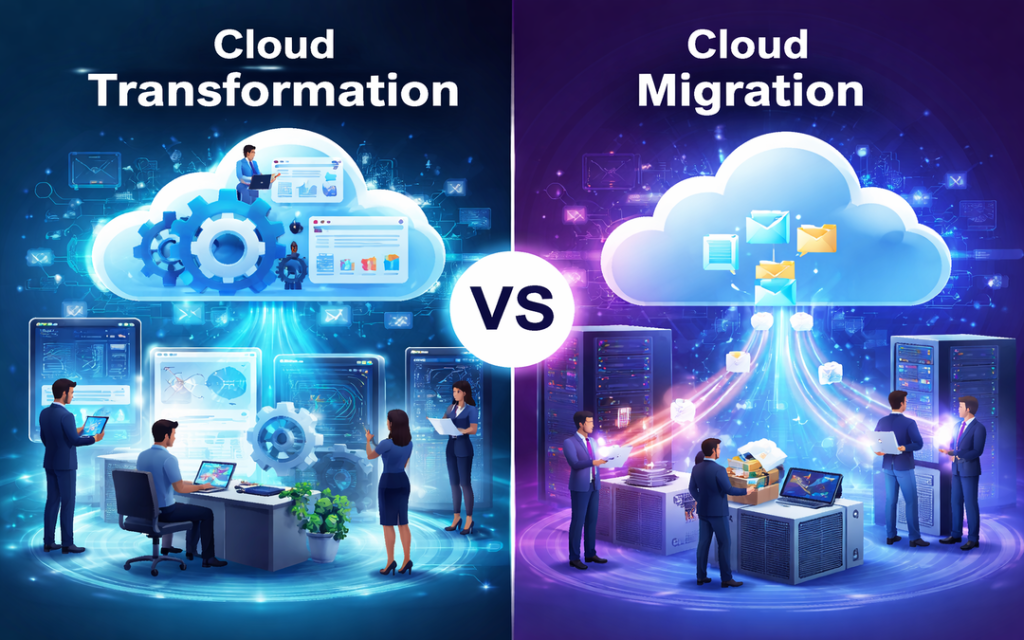
Cloud Transformation vs Cloud Migration: Understanding the Real Difference

With businesses embracing digital transformation, migrating to cloud is more than just a trend. However, several organizations confuse cloud migration with cloud transformation. Even if both are part of similar journey, they represent different approaches and results.

Cloud Migration

Cloud migration is a process of migrating your existing data, applications and systems from on premise servers to a cloud environment. In maximum cases, this involves shifting workloads with minimum changes. Businesses often select this route as it is fast and less disruptive. The idea is replicating your existing setup in the cloud without any redesigning.

This approach is often referred to as life and shift.

Why Businesses Select Cloud Migration?

  • Rapid transition to cloud infrastructure
  • Low upfront investment
  • Minimum changes to existing systems
  • Instant benefits such as measurability and remote access

Cloud Transformation

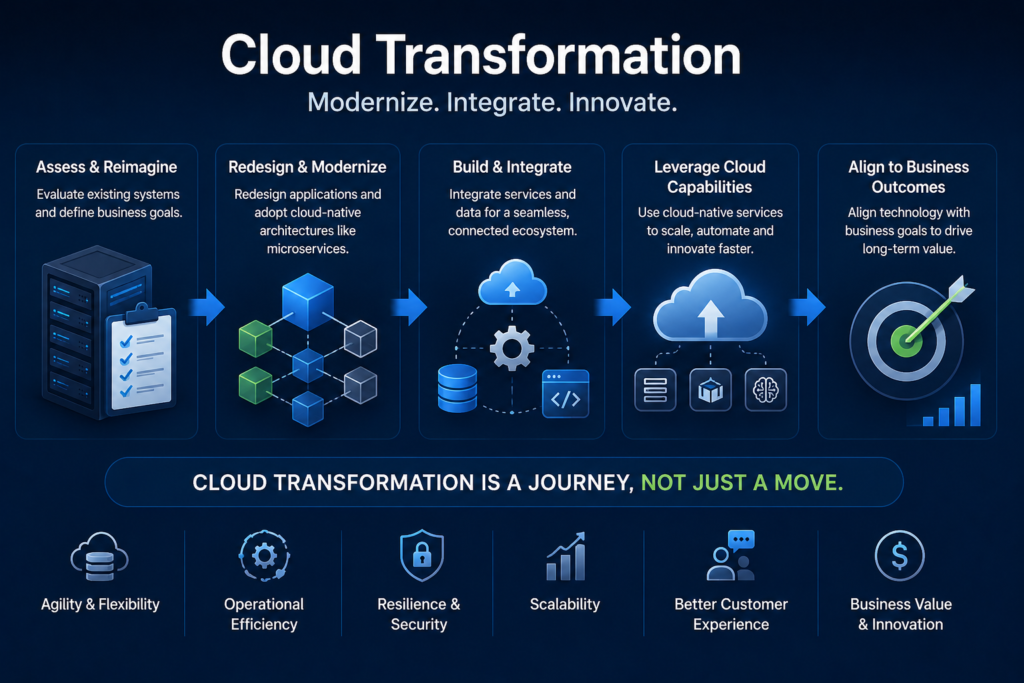
Cloud transformation takes things a step forward. Rather than simple migrating systems, it focuses on rethinking how such systems work in any cloud environment.

It includes redesigning applications, updating infrastructure and keeping technology and business goals well-aligned. Companies adopt cloud friendly practices like micro services, consistent integration and for complete leverage of cloud abilities. This approach is more planned and long term.

Why Is Cloud Transformation Different?

  • Re-architecting or rebuilding applications
  • Utilizing cloud native technologies
  • Enhancing performance and measurability
  • Allowing innovation and agility
  • Altering workflows and business processes

Cloud transformation is all about evolving your business with the cloud

Key Difference Between Cloud Migration And Cloud Transformation

Even if they are closely associated but the difference lies in intent as well as depth.

Purpose

Cloud migration mainly focuses on moving to the cloud, but cloud transformation focuses on increasing what the cloud can do for your business.

Level of change

Migration includes minimum changes but transformation might need a complete renovation of processes and systems.

Speed

Migration is fast and can be accomplished in a short time. Transformation is slow and consistent.

Cost perspective

Migration is more cost efficient in initial phase. Transformation needs high investment but delivers good long term value.

Impact on business

Migration enhances operational effectiveness. Transformation drives invention, growth and competitive benefits.

When You Should Select Cloud Migration?

Cloud migration is a good option when:

  • You wish to rapidly decrease dependency on physical infrastructure
  • Your existing systems are still efficient
  • You require a low risk entry into the cloud
  • There are limited budget and time

It works well as initial point for organizations who are starting their cloud journey.

When Should You Select Cloud Transformation?

Cloud transformation is good when:

  • Your systems are outdated or difficult to measure
  • You want to enhance performance and user experience
  • Innovation and agility are your main priorities of business
  • You want long term digital growth

It is best choice for companies wanting to stay ahead in a competitive market.

A Practical Approach: Combination Of Both

In real, most of the organizations do not select one over the other both they use both.

A common plan is starting with cloud migration to rapidly move workloads and then slowly adopt cloud transformations practices for optimizing and modernizing those systems.

This phase wise approach decreases risk while allowing long term success.

Speed Up Your Cloud Journey With Right Partner

If you are thinking of moving beyond basic migration and unlock your complete potential of the cloud, getting associated with the right experts can bring in all the difference.

Pexo It Consulting provides special cloud transformation services designed for assisting businesses in modernizing their infrastructure, increase performance and adopt cloud native solutions. Their approach mainly focuses on making measurable, effective and future ready systems customized for your business requirements.

Conclusion

Cloud migration and cloud transformation are not similar – but deeply connected. Migration assists in getting to the cloud rapidly, while transformation assists in using the cloud efficiently.

If you aim for short term effectiveness, migration is great to start with. But you are aiming for long term invention and growth, cloud transformation is where the real value lies.

FAQS

Is cloud migration enough for digital transformation?

Not all time. While migration offers advantages, transformations is required for complete leverage of cloud capabilities.

Can small businesses adopt cloud transformations?

Yes, they can benefit by adopting measurable and cost effective cloud native solutions.

How long does cloud transformations takes?

It relies on system complexity, but usually it’s a consistent process rather than a onetime project.

Do I require to migrate before transforming?

In maximum cases, yes. Migration often acts as an initial step towards a broad transformation strategy.

What is the Difference Between IT Support and Cybersecurity Services?

In a digital-first business environment, technology is deeply embedded in how organizations store data, run their operations, and communicate with customers. Hence, IT Support and Cybersecurity Services have become two services that every business, regardless of size, requires. Although these terms are used side-by-side, they have different goals and offer separate pieces to an organization’s tech puzzle.

The distinctions between IT support and cybersecurity services can help businesses make informed decisions, allocate resources efficiently, and strength their overall IT ecosystem.

What Is IT Support?

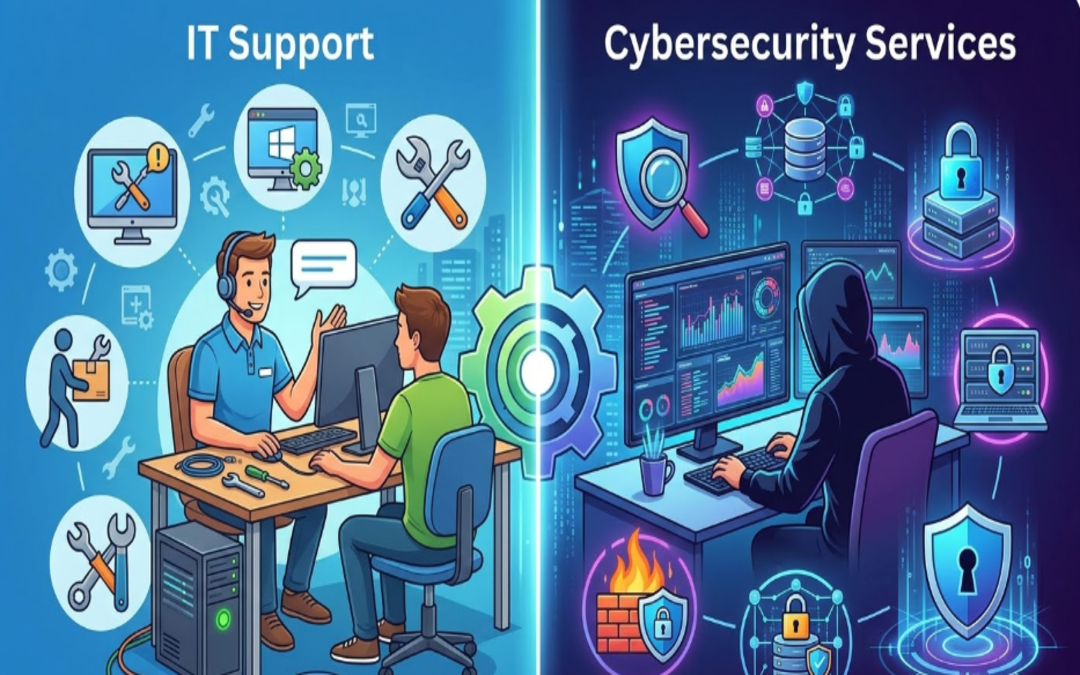
IT support is a variety of services that assist in maintaining and troubleshooting an organization’s technology systems. The main purpose of IT support is to maintain the smooth and effective operation of all hardware, software and networks.

IT support teams take care of daily technical challenges like:

• Repairing software bugs and system mistakes
• Installing and configuring computer systems
• Managing networks and connectivity
• Installing updates and patches
• Providing helpdesk support to employees

These services are vital to help minimize downtime and keep employees productive. That is entirely up to the organization, as IT support can be in-house or outsourced to managed service providers.

What Are Cybersecurity Services?

Cybersecurity services primarily deal with securing an organization’s systems, networks, and data from cyber threats like hacking, malware, phishing or ransomware attacks. The main purpose is to protect sensitive information and restrict unauthorized access.

Cybersecurity is a proactive defensive position that involves:

• Monitoring systems for suspicious activity
• Firewall | Intrusion detection system
• Vulnerability assessment and penetration testing
• Handling encryption and access policies
• Managing and recovering from security incidents

With the increasing sophistication of cyber threats, cybersecurity services are vital in building trust, compliance and ensuring business continuity.

The Key Differences between IT Support and Cybersecurity Services

While IT support and cybersecurity services are closely linked, there are significant focus differences in their approach and responsibilities.

Purpose and Focus

IT support is concerned with the performance of systems, providing solutions to end-user technical problems. It guarantees the functioning and efficacy of all IT systems.

In contrast, cybersecurity aims to safeguard systems and data from various threats. Its purpose is to avert breaches and risk.

Reactive vs. Proactive Approach

IT support is also typically reactive — it clicks in when things go wrong, like a system crash or a connectivity issue.

Cybersecurity is mostly preventative — it finds weaknesses and puts protections in place to stop attacks before they occur.

Scope of Work

Media coverage and the support provided by IT services have evolved, starting from technical aspects to hardware set-up, software installation, and user-related devices.

Cybersecurity services, on the other hand, are more specialized and focused solely on risk management, threat detection, and data protection.

Skill Sets Required

IT Support staff are usually well-versed in system administration, networking, and troubleshooting.

Specialized knowledge is necessary in fields like ethical hacking, encryption, risk assessment, and compliance standards for cybersecurity specialists.

Why Businesses Need Both

IT support and cybersecurity should not be considered mutually exclusive — the two fields work together. An organisation could boast great IT support but no cyber security infrastructure in place, opening itself up to being hacked. On the same vein, robust cybersecurity may result in operational inefficiencies without dependably timed IT assistance.

They work together to provide a balanced and secure IT ecosystem ensuring systems operate seamlessly while safeguarding data.

How to Choose the Right IT Support Partner

However, businesses that want to work smarter while achieving strong protection and ownership should engage a reputable IT service provider. IT services like IT Support by Pexo use not just technical expertise but also proactive management to ensure that systems work together seamlessly. Organizations that utilize professional IT support can expect less downtime, greater productivity, and a solid foundation upon which other elements (such as cybersecurity) can be built.

Why IT Support and Cybersecurity Go Hand in Hand

In a contemporary business, IT support and cybersecurity teams frequently work in close collaboration. For example:

• Those IT support who manage systems regularly ensure that security patches and updates are deployed, assisting in eliminating security vulnerabilities
• Cybersecurity teams define policies implemented by IT support
• Both teams collaborate during incident response and recovery

This partnership assures that enterprises are not merely operational but bolstered from evolving digital threats.

When to Invest in Cybersecurity?

If the businesses facing this issue fall into these categories, they need to prioritize cybersecurity services:

• Manage sensitive customer or financial information
• Operate in regulated industries
• Adopt cloud systems and remote work environments
• Have experienced previous cyber incidents

By investing in cybersecurity from the get-go, a company can avoid costly breaches and protect its reputation.

Conclusion

Though IT support and cyber security services work toward different goals, they are both critical elements of a modern business strategy. IT support keeps the systems up and running, while cybersecurity secures those systems against threats and vulnerabilities.

Grasping the disparity between the two and appreciating their significance enables enterprises to develop a holistic IT strategy that facilitates growth, enhances productivity, and secures critical assets.

What is an IT Managed Service Provider and How Do Managed IT Services Work?

Modern businesses rely heavily on technology to manage operations, store data, communicate with customers, and maintain productivity. As technology continues to evolve, managing IT infrastructure has become more complex. Many organizations struggle to manage networks, cybersecurity, and system maintenance with limited internal resources. To overcome these challenges, businesses often partner with an IT Managed Service Provider (MSP). Managed IT services allow companies to outsource the maintenance and support of their technology systems to skilled professionals.

What is an IT Managed Service Provider?

An IT Managed Services Provider is a unique firm that services and maintains a business’s IT environment continuously. Organizations do not need a full in-house IT department; instead, they rely on MSPs to handle some of the most critical technology projects, including network maintenance, system monitoring, cybersecurity, and technical support.

MSPs act as an IT outsourcing force that maintains a firm’s technology to be secure and reliable. They also apply high-level monitoring equipment and technical knowledge capabilities to diagnose problems likely to cause any problems in advance and fix them before they occur to the business. Such a proactive solution can assist companies not only in preventing costly downtime but also in preserving efficient workflow.

Managed IT Services Exploration.

Managed IT services are the long-term association program between an organization and an IT service provider for the administration of the organization’s technology systems. These services are often offered on a subscription basis, with a monthly plan, so businesses can obtain regular, uninterrupted IT services at a set price.

Conventional IT support is typically based on a break-fix model, where technicians troubleshoot the system. However, managed IT services rely on proactive maintenance and continuous monitoring. This will lower the risks of system failures in the system, and enhance the overall performance of IT.

An average managed IT services package can include:

•      System management, Network monitoring.
•      Threat detection and solutions to cybersecurity.
•      Disaster recovery planning/data backup.
•      Storing and management of cloud infrastructure.
•      Employee assistance.
•      Patch management and software upkeep.
•      Technology planning and IT consulting.

Outsourcing such tasks gives businesses access to a pool of IT professionals who can better operate their technology environment.

How Managed IT Services Work

There are several major factors that define how MSPs provide their services.

Constant monitoring in the system.

Managed service providers have sophisticated monitoring platforms that monitor the performance of networks, servers, and the devices attached to them 24/7. Should any anomaly be noticed in performance or the actual occurrence of any odd activity, the IT team is notified in real time, allowing them to intervene before the matter gets out of control.

Remote Technical Support

Secure management tools can be accessed remotely to solve many IT problems. MSP technicians will be able to enter systems for troubleshooting issues, install updates and carry out maintenance without physically going to the office. This will enable faster responses and more effective problem resolution.

Service Agreements

Service Level Agreements (SLAs) are typically used to control managed IT services. These contracts specify the scope of operations, turnaround time, and anticipated service quality. SLAs help businesses understand what they will receive and the provider’s accountability.

Cybersecurity Management

Managed IT services prioritize security. The various barriers that MSPs deploy to protect against viruses and related threats include firewalls, antivirus applications, endpoint protection, and round-the-clock threat scanning. Such filters can protect companies against cyberattacks such as phishing, ransomware, and unauthorized access.

Regular III Maintenance and Updates.

To ensure systems remain reliable, managed service providers frequently update their software, apply security patches, and upgrade systems to optimize performance. Maintenance of systems helps prevent vulnerabilities and enables efficient technology performance.

How Pexo Helps?

When companies are interested in the expansion of their IT infrastructure and the minimization of difficulties related to technologies, it can be extremely helpful to engage in cooperation with a reliable service provider. Professionals like those at Pexo’s provide proactive IT monitoring, adaptable cybersecurity, and professional technical support tailored to the business. Through collaboration with experienced individuals, organizations can maintain consistent technology systems while focusing on growth, innovation, and customer care.

Conclusion

IT Managed Service Provider assists companies to effectively administering their technology infrastructure through the provision of preventive monitoring, cybersecurity, system upkeep, and technical assistance. Rather than addressing them when they arise, the IT services of managed care are aimed at preventing the issues and ensuring the maintenance of systems. The idea of becoming a managed service provider to businesses seeking cost-effective, enhanced security, and greater reliability in their IT operations is a smart, strategic move.

Frequently Asked Questions

1. What is the activity of a managed service provider?

A managed service provider manages, maintains, and contributes to IT infrastructure of a company, such as networks, security systems, and cloud environments.

2. What are the commonly used methods of pricing managed IT services?

The majority of providers offer managed IT services on a monthly subscription basis, depending on the level of service required.

3. Do small businesses benefit through managed IT services?

Yes, the benefit of small businesses is that they have easy access to professional IT support at a lower cost than maintaining a full internal IT team.

4. Why are managed IT services unlike typical IT support?

Managed IT services focus on preventive checkups and proactive measures, whereas traditional IT support services are primarily concerned with addressing issues as they arise.

The Future of Cybersecurity in 2026: Key Trends Every Business Must Know

With businesses increasing digital, cybersecurity is no longer a mere IT issue; it is a key business priority. The year is 2026, and the world of cybersecurity has undergone significant transformation. Security teams must remain vigilantly initiative-taking to protect their organizations from data breaches, and all types of organizations are target for attack.

The following are the six key cybersecurity trends shaping 2026 that will help your business know what risks to prepare for and how best to approach them with resilient security strategies.

The Disturbance – The Concept of AI-driven Cyber Threats

AI is revolutionizing both ends of cybersecurity. It facilitates the speedy detection of threats but also arms cybercriminals to conduct sophisticated strikes.

Attackers are increasingly using AI in 2026 too:

• Backdoor phishing campaigns with highly tailored messages
• More quickly discover weaknesses in systems
• Evade traditional security detection tools

It means businesses need AI-powered cybersecurity solutions that can recognize anomalous behavior, respond in real time, and learn constantly from new threats.

Zero Trust Architecture Becomes Standard

The old “trust but verify” paradigm is no longer good enough. In 2026, Zero Trust Architecture (ZTA) is now the de facto best cybersecurity practice.

Zero Trust works on the zero-trust model:

• Do Not Trust User or Device by Default
• Continuously verify identity and access
• Control access by role and need

As remote tasks and cloud systems become business as usual, Zero Trust guarantees that only the right users get access to the secure data, reducing the security risks for organizations.

Increased Focus on Cloud Security

As cloud computing remains at the forefront of business operations, no wonder ensuring its safety will be one of the top 2026 IT security trends. Misconfigured cloud settings continue to be one of the top causes of data breaches.

Businesses must focus on:

• Securing cloud infrastructure and applications
• Monitoring access and user activity
• Encryption of sensitive cloud-based data

In a world where more organizations are shifting to multi-cloud and hybrid, being able to get visibility and control across the platforms gains importance.

Growing Threat of Ransomware Attacks

Ransomware is still, at this stage of the game, one of the most harmful cyber threats. By 2026, these attacks will grow sophisticated and targeted.

Cybercriminals are now:

• Attacking essential sectors like health care, finance, and logistics
• Employing double extortion (stealing data prior to encryption)
• Demanding higher ransom payments

It is all too easy for a business to think they cannot at least afford these, when instead they need to be investing in strong backup systems, endpoint protection, and incident response plans to minimize the impact of such attacks.

The Importance of Cybersecurity Awareness

Human error remains a significant risk. Even the best systems can fail if employees are not trained to identify threats.

In 2026, organizations are prioritizing:

• Regular cybersecurity training programs
• Phishing simulation exercises
• Strong password and authentication policies

Of all the things businesses can do, building a culture of security awareness is one of the most effective measures for minimizing cyber risks.

Strengthening Your Cybersecurity Strategy

With cyber threats becoming increasingly sophisticated, businesses must adopt an initiative-taking and holistic approach to security. Enlisting experts has an enormous impact on discovering vulnerabilities and putting the right safeguards in place.

Advanced Cybersecurity Services by Pexo for Modern Enterprises

Professional Cyber Security Services offered by Pexo are essential for organizations aiming to stay proactive and strengthen their cybersecurity posture. Our diverse expertise, ranging from cybersecurity risk assessments to advanced threat monitoring solutions, ensures that you have the right cybersecurity partner to support your business in an ever-evolving threat landscape.

Regulatory Compliance and Data Privacy

Countries across the globe are clamping down on data protection. AQUISITION Since 2026 compliance is not optional, it is necessary.

Businesses must ensure:

• How to manage and store data properly
• Transparent privacy policies
• Regional and global regulatory compliance

Non-compliance carries hefty fines and harm to brand reputation.

IoT Security Risks: New Attack Surface

Internet of Things (IoT) is growing fast and connects devices in various sectors. But every connected device provides a potential gateway for cyberattacks.

In 2026, businesses must:

• Secure all connected devices
• Regularly update firmware and software
• Look for anomalies in network activity

Now IoT security is crucial in the overall CIS strategy.

Conclusion

Cyber Security in 2026: The Future of Cybersecurity in Vision for 2026 As business moves away from reaction to initiative-taking intelligent security.

With the help of AI-powered tools, incorporating Zero Trust models into their security strategy, making sure that their cloud environments are safe and taking an initiative-taking approach to raising employee awareness – organizations can remain one step ahead of cyber risks. Cybersecurity is beyond protection, it is about trust, continuity, and sustainable growth in a digital era.

Frequently Asked Questions (FAQs)

So, what makes cybersecurity more crucial in 2026?

As cyber threats grow more sophisticated and frequent, protecting sensitive data and maintaining operational continuity are critical for any organization.

Explain what Zero Trust is in cybersecurity.

This model, known as Zero Trust, builds on the traditional perimeter model of security by stipulating that all users and systems must be consistently validated before being granted access to sensitive data.

How can businesses defend against ransomware?

Regular data backups, strong endpoint security, employee training, and incident response planning are some business practices that can help mitigate the impact of ransomware attacks.

How is cloud security different from traditional security?

Yes, cloud security guards’ data, applications and services hosted in the cloud which require different tools and strategies thanon-premisessystems.ms.

Data Backup 101: Exploring the Four Core Types for Optimal Data Protection

In the age of digital revolution, information is among the most useful commodities of corporations and individuals. Business organisations and companies have a lot of information stored, including customer data, financial statements, emails, and other important business documents. The loss of such information through cyberattacks, failure of hardware, or human error can lead to significant derailments and loss of money. This is the reason behind the necessity of a good data backup strategy to ensure valuable data.

Why Data Backup Is Important

The contemporary businesses are highly dependent on digital systems so as to operate effectively. Nevertheless, there are various causes of data loss, such as ransomware attacks, deletion as a result of accidental events, hardware issues, and natural disasters. It is almost impossible to retrieve lost data without the right backup system, since it can be very hard to retrieve the information.

An effective backup plan has a number of advantages. It safeguards delicate business information and saves time when the system goes down, and enables organizations to retrieve valuable files very fast. Also, in most cases, companies have to possess backup systems due to the data protection regulations in the industry. 

The Four Core Types of Data Backup

IT professionals deploy various forms of backups in order to secure the information. Although each approach has its distinct benefits in terms of storage capacity, recovery speed, and system requirements, the methods have their own distinct ways of defaulting. These are the four major data backups: Full Backup, Incremental Backup, Differential Backup, and Mirror Backup.

1. Full Backup

The most comprehensive and simplest way of backup is a complete backup. It incorporates the entire data in a system and transferring the data to a location of backup. All files, folders as well as datasets are added making a wholesome replica of the original system.

The greatest benefit of full backups is that it is easy to restore data. The whole data is saved in a single backup file, and therefore, the lost data can be easily recovered. Nevertheless, this technique also consumes the highest storage area and the longest period to accomplish particularly when they have high quantity of data.

2. Incremental Backup

Incremental backup does not save all the data, but only that which has changed since the previous backup was done. It does not copy all the files in the databases but only the newly created or modified files.

To illustrate, in case a full backup is written on Sunday, and an incremental backup is written on Monday, the Monday backup will only write any changes that have occurred since Sunday. The incremental backup of Tuesday will subsequently save the differences between the backup on Monday.

The technique will greatly decrease the storage and backup time. Yet, it is more expensive to recover data in incremental backups as the system will be required to merge the entire backup with the individual incremental backs that are generated. 

3. Differential Backup

A differential backup is one in which all the data that has been changed since the last complete back up is saved. This is unlike incremental backups in which only the difference between the old one and the new one is stored up in the old version. Differential backups save up the difference between the last full backup and the subsequent ones.

Speedy recovery is the primary benefit of the differential backups. In data restoration, the system will only require the complete backup and the latest differential one. Since the files are circled though become large as time goes by until a complete backup is done again. 

4. Mirror Backup

An exact copy of original data is created with the help of a mirror backup in real time. It also reflects the entire file organization and guarantees that the backup will have the same copy of the source system.

What is good with this method is that one can get a file instantly since the backup is the same dataset. Restoration is very quick because the mirrored data may be availed immediately. Mirror backups however do not keep version history. In case of deletion or corruption of a file within the original system, the same is reflected in the mirror backup.

Due to this drawback, mirror backups tend to be implemented alongside other backup measures so as to ensure real-time copying as well as data safeguard of history.

Professional Data Backup Solutions

At Pexo, It may not be easy to implement an effective system of backup without specialized assistance. The solutions provided are professional services like how businesses can develop secure and automated backup strategies. These are cloud backup solutions, disaster recovery planning, and continuous data protection, where data protection must keep the important information intact and recoverable in case an unexpected event happens.

Conclusion

At Pexo, One of the basic components of the contemporary IT management and cybersecurity is the data backup. Lack of a reliable backup system also exposes businesses to the risk of business losing vital information that may have drastic consequences on business. These four fundamental types of backups, namely full, incremental, differential and mirror, do assist companies to create an efficient backup strategy that suits the organization storage efficiency, speed of backup and speed of recovery.