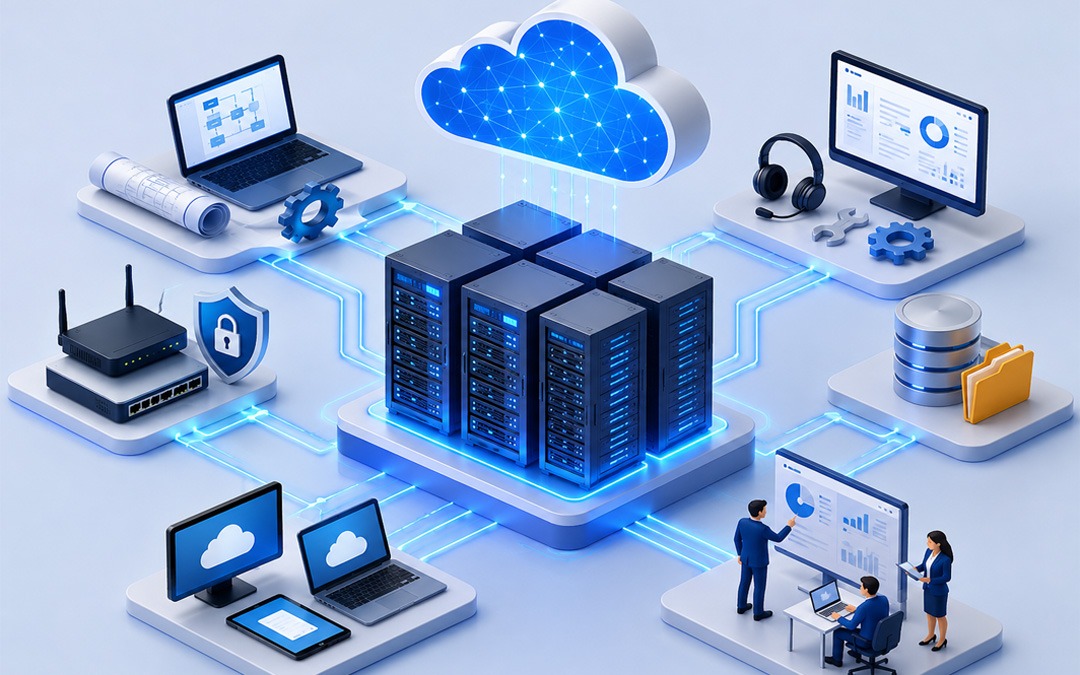
What Is The Difference Between Hybrid And Multi-Cloud?

A hybrid cloud is a system that combines both private and public clouds into a single connected configuration. Multi-cloud is a hybrid cloud that uses several public clouds like AWS Azure and Google Cloud, without linking them. Multi-cloud is more flexible and does not rely on one vendor.

Today, most businesses store and operate their applications in the “cloud.” The cloud isn’t one single thing. It’s possible to use hybrid cloud or multi-cloud.

Both terms are often confused. Both terms sound the same and do have some overlap. They work differently, and they solve different issues. You’ll learn what they mean, how to compare them, and which one might work best for you.

What Is Hybrid Cloud Technology?

A hybrid cloud setup is one that connects at least two public clouds, such as Amazon Web Services (AWS), Microsoft Azure or Google Cloud. is the key here. Data and applications can be moved between private and public cloud environments in a hybrid setup.

Imagine a co-working area and your home office. When you require more space or resources, you can head over to the shared co-working area. You move seamlessly between the two spaces, as they are both part of your daily routine.

Why Hybrid Cloud Is Used By Businesses?

Hybrid Cloud
  • For legal and security reasons, they must keep sensitive data on their private servers
  • The public clouds are “bursting” during peak periods, but they don’t want to pay for the capacity all year round.
  • The cloud is a gradual migration from older systems

Multi-cloud: What is it?

Multi-cloud is using more than one public cloud provider at once. A company may run their storage system on AWS and use Microsoft Azure to provide AI tools. They might also use Google Cloud as a platform for analytics.

Multi-cloud, unlike hybrid cloud does not necessarily mean that these clouds are interconnected. Each cloud may operate separately, handling different tasks.

Multi-cloud, to use the same office metaphor: it is the equivalent of renting desks at three co-working spaces in the city. Each one has been chosen for its suitability.

What is the business case for multi-cloud computing?

  • Avoid being tied to one cloud service provider
  • Choose the right tool for each job from different providers
  • If one cloud fails, the others continue to run.
  • Data storage regulations require specific geographical regions to be stored in order to comply with the requirements.

What’s The Main Difference Between Multi-Cloud And Hybrid Cloud?

What they are connecting and why is the biggest difference.

           Hybrid Cloud                             Multi-Cloud
It combinesCloud computing: private + publicMulti-public clouds
Do they connect?Yes. It is tightly integratedNot necessarily
Main goalFlexible + secureFlexible + Best-of-Breed Services
The Best ofRegulation of industries and gradual migrationAvoiding vendor lock-in, resilience


The hybrid cloud bridges your private cloud infrastructure to the public cloud. Multi-cloud means diversifying your cloud services across different public providers. Businesses can use both a private cloud and multiple public clouds at the same. This is called hybrid multi-cloud.

What Is The Best Option For You?

Your specific needs will determine the best choice for you.

If you are unsure, choose hybrid cloud:

  • Your servers are a safe place to store sensitive information (data on healthcare, finances, and government).
  • The transition from your on-premises servers to cloud is about halfway complete
  • Data should flow easily and seamlessly between your systems.

Select multi-cloud mode if:

  • Want to be independent of a cloud provider?
  • Cloud providers have specialized services for different teams.
  • Your business’s top priorities are uptime and redundancy.

Select hybrid multi-cloud when:

  • Both private cloud infrastructure security and the flexibility provided by multiple public clouds providers are essential.

No one answer fits all. The Flexera 2024 State of the Cloud Report shows that 89% of businesses now have a multicloud strategy and 73% have a hybrid one, indicating they don’t want to pick just one.

Challenges With Different Approaches

Both setups are not without their complications.

Hybrid cloud challenges:

  • Securely connecting private and public systems can be a complex task
  • Integration requires IT professionals to be skilled in managing the integration
  • If the infrastructure is outdated, costs can mount.

Multi-cloud challenges:

  • Multiple vendors mean multiple interfaces and billing systems.
  • It is harder to monitor data security across platforms
  • The cost and time involved in moving data from one provider to another can be high.

Choose The Setup That Best Suits Your Goals

Multi-cloud and hybrid cloud both offer businesses greater flexibility than using a single platform, but solve very different problems. The hybrid cloud was designed for companies that want to securely connect their private infrastructure and the public cloud. Multi-cloud was designed for companies that wish to take advantage of the best features from different providers, without being locked into one.

Pexo’s cloud transformation services will accelerate your digital transformation. Our experts can help with a variety of cloud environments, including hybrid clouds, multi-clouds, and cloud native. They will also optimize performance, lower costs, build a scalable architecture, and support your business’ growth.

The first step is to understand the differences. Next, you will need to audit your existing infrastructure and identify your pain points. You can then consult a cloud architect on which combination or model is best for your business.

FAQs

What is the difference between hybrid cloud and multi-cloud computing?

No. A hybrid cloud is a cloud that connects on-premises or private servers with a cloud public. Multi-cloud is a combination of two or more cloud service providers. Both have distinct goals and different structures. However, some companies use them both simultaneously.

Is it possible to use hybrid cloud as well as multi-cloud simultaneously?

Yes. Hybrid multi-cloud is a setup which uses multiple public cloud services alongside a private one. This approach is used by many large companies to increase flexibility, security and resilience.

Is hybrid cloud cheaper than multi-cloud?

Your existing infrastructure will determine the cost. If you have on-premises server, hybrid cloud costs can be higher. The multi-cloud model can help you save money by offering services at competitive prices, but it also adds complexity to your operations.

Is hybrid cloud more secure than multi-cloud?

For workloads that are sensitive to security, hybrid cloud is preferred because the data can be kept on a server private. It is possible to make multi-cloud highly secure but this requires careful governance on multiple platforms.

What Are the 4 Stages of Disaster Recovery?

Mitigation, preparedness and response are the four stages of recovery from a disaster. The four stages of disaster recovery are mitigation, preparedness, response and recovery. Each one has a specific role to play from reducing the risk prior to a catastrophe until rebuilding is complete. They form a circle that can help communities and organizations survive and recover after emergencies.

Prepare yourself for disasters, but they won’t come to you. Planning is the key to preventing disasters like earthquakes, floods, cyber-attacks, wildfires and other natural disasters.

Disaster recovery has four distinct stages. Each stage focuses on a specific part of the issue. If you skip one stage, the entire system becomes weaker. Understanding all four will give you a solid framework when things do not go as planned.

The 4 Stages of Disaster Recovery: A Step-by-Step Guide

 Disaster Recovery

Stage 1: What Is Mitigation in Disaster Recovery?

Before a catastrophe occurs, mitigation is done. It is important to reduce the damage that a disaster could cause.

Consider mitigation to be the removal of risks, before they turn into emergencies. Mitigation is done by a city when it builds flood barriers. Mitigation is done by a company who moves sensitive data onto a backup server. Homeowners who install new wiring in order to avoid electrical fires are doing mitigation.

The following are key mitigation measures:

  • Risks specific to your industry or location
  • Enhanced infrastructure for handling known threats
  • Safety codes and Building Standards
  • Early warning signs of illness and injury: Training employees to identify them

Mitigation does not eliminate disaster entirely. The worst outcome is limited.

Stage 2: What is preparedness in disaster recovery?

The gap between knowing that a catastrophe could occur and knowing what to do in the event of one is closed by being prepared.

During this stage, you will be building up plans, preparing people and gathering tools to help respond rapidly. Preparation work is done during quiet periods, so that your team will not be learning new things when the crisis strikes.

Common preparation activities include

  • Writing a disaster recovery plan
  • Exercises that simulate running drills
  • Stockpiling supplies and equipment for emergencies
  • Communication systems in crisis situations
  • It is important to assign roles that everyone understands.

Preparedness isn’t a plan in a file that never gets used. A real preparedness is when your team practices the plan, and can adjust it when something does not work out as planned.

Stage 3: How does the response stage work during a disaster?

The immediate aftermath of a catastrophe is the response. The priority in this stage is to protect people and limit further damage.

The time to respond is not for lengthy meetings. The time has come to execute the plan that was created during the preparation stage. It is for this reason that preparedness is so important. Responses only work well when the preparation has been completed.

Responses typically include the following:

  • The emergency response team can be activated
  • Notifying affected individuals and evacuation if needed
  • Containing damage (extinguishing fires, isolating compromised systems)
  • Coordination with external emergency agencies and services
  • Documenting the events as they unfold

Here, speed and clarity matter. Your team will cause less damage if they respond quickly.

Stage 4: What happens during the recovery stage?

Once the immediate danger has passed, recovery begins. It is important to return to normal operation and do so in a more robust way than ever before.

Recovery may sound like it’s the last step, but often is the most difficult. The physical rebuilding of affected areas, the restoration of systems, and the psychological support provided to the people may take several weeks, even months depending on the severity.

Recovery efforts include:

  • Rebuilding or replacing infrastructure damaged
  • Backups and restoring data from them
  • Staff, customers, and residents affected by an event
  • Update the Disaster Recovery Plan after reviewing what went wrong
  • You can apply for insurance or grant reimbursements.

Strong recovery accomplishes two important things: It brings operations online and feeds the lessons learned into mitigation and preparation stages. Disaster recovery is a continuous process, and not just a linear one.

Create your disaster recovery plan before you need it

Usually, organizations do not seriously consider disaster recovery until something has gone wrong. It is expensive to wait until disaster strikes.

You can start working from the four phases of mitigation, preparedness and response. In the stage of mitigation, identify your greatest risks. Build your plan during preparedness. Run drills so your team can execute during response. Use every experience in recovery to help you improve the next step.

Pexo’s disaster recovery and data backup solutions will help you recover from any unexpected interruptions. We offer proactive data backup and recovery, as well as secure data protection and rapid restoration services to minimize downtime and protect your critical information.

It is important to remember that disaster recovery does not happen in a single project. This is a continuous process which gets better every time it’s revisited.

FAQ

Which are the four phases of recovery after a disaster? 

The four stages are preparedness, response and recovery. Before a catastrophe, mitigation reduces the risk. Preparedness creates plans and trains team members. The immediate response is to deal with the crisis. After the crisis, recovery restores normal operation.

How do mitigation and preparation differ?

The goal of mitigation is to reduce the impact or likelihood of disasters before they happen, such as by building flood defences. Preparation focuses on training and planning so that your team is prepared for a catastrophe.

Why does the recovery stage seem to be so long compared with response?

Response is limited to the first few hours after an emergency strikes. Recovery is the process of restoring systems, infrastructure and people to their original state. This can take several weeks or months depending on how severe the damage was.

Does Disaster Recovery apply to Businesses as well as Communities?

Yes. Disaster recovery plans are used by businesses to safeguard data, systems and operations. Community groups use disaster recovery planning to safeguard residents and infrastructure. Both contexts use the same four steps, but specific actions are different

When should disaster recovery plans be updated?

Your disaster recovery plan should be re-evaluated at least annually and every time there is a major incident or change to your environment or organization.

Threat Vectors, Advanced Persistent Threats (APTs), and Insider Threats in Cyber Security: A Complete Guide

The threat vectors refer to the methods attackers employ to gain access into your system. APTs are targeted, long-term attacks carried out by highly skilled groups. The insider threat is a result of people who are already working in your company. The first step to building real defense is understanding all three.

Cyber threats may not be obvious. The attackers do not always knock down the door. They usually wait in a side-window.

The guide summarizes three of today’s biggest threats to cybersecurity: Advanced Persistent Attacks (APTs), insider attacks, and threat vectors. Learn what they mean, What Their Connections Are, And How You Can Protect Yourself.

What Are The Threats Vectors Of Cybersecurity?

Threat vectors are any way an attacker can get inside your system. Imagine your network as a home. Each door, air vent, or window is an attack vector.

The following are some of the most common threats:

  • Phishing Emails: Fake messages to trick users into clicking on bad links
  • Weak Passwords : Easy-to-guess credentials which let attackers in
  • Unpatched Software: Outdated programs with known vulnerabilities
  • Removeable devices : Infected USB drives connected to company computers
  • Third party vendors: external partners who have access to your system

The attack is not the threat vectors. These are not the attack itself. When an attacker discovers one, all other attacks follow.

What Are Advanced Persistent Threats (Apts)?

Advanced Persistent Threats

They sound complex. The core concept is very simple.

A long-term, persistent, and targeted attack is an Advanced Persistent threat. The attackers sneak in and stay hidden for weeks or even months. These aren’t robbers who just grab and run. They have patience.

Who Is Responsible For Apts And Who Does It?

APTs tend to be run by groups that are sometimes supported by government. The APTs target critical infrastructure, large organisations, and government agencies.

What is APT?

  • entry: An attacker finds a vector of attack and gets inside your network
  • Get a foothold Install tools that will keep you connected even when the entry point is closed
  • Move Laterally : They search for data on your network by moving laterally
  • Data exfiltration: they quietly copy data and send it out over time
  • Stay Hidden : They avoid detection the whole time.

What’s the scary part? IBM’s Cost of a Data Breach Report states that some APT attacks can go unnoticed for more than 200 days. The damage has already been done by the time the issue is discovered.

Insider Threats: The Danger From Within

Inside threats are not always external. Insider threats come from people with access to employees, contractors or partners.

Two main categories exist:

  • Insiders who are malicious: People who steal data or intentionally damage it (a disgruntled worker, for instance).
  • Insiders who harm others without intending to do so, such as clicking on a phishing site or sending a file to the wrong recipient

Traditional security measures are designed to prevent outsiders from entering. These tools are often unable to detect threats that have already been introduced.

Insider threats are responsible for approximately 19% of data breaches, according to the Verizon Data Breach Investigations Report 2023. This number may be undercounted because incidents involving insiders are more difficult to report and detect.

Threat Vectors, Insider Threats, And Apts All Work Together

Rarely do these three attacks work separately. These three threats are often combined by attackers.

The phishing emails (a vector of threat) trick the employee to give up his login. This credential is the gateway for APT groups. Once the attacker is inside the network, they move quietly. It looks normal from the outside. Data is leaving the building from the inside.

This is the reason why separating these problems in a production environment does not work. All three problems must be addressed simultaneously by your defense.

How to Protect Yourself Against these Threats

It is not necessary to resolve everything immediately. You can start here.

  • Instruct your staff Most attacks begin with human error. You can reduce your risk of phishing attacks and insider threats by undergoing regular security training.
  • Use the principle of the least privilege. Give users the only access necessary to perform their duties. If an account is compromised, less access will mean less damage.
  • Update your software. Unpatched systems invite hackers. Stick to a schedule.
  • Track user behaviour Tools such as SIEM platforms (Security Information and Event Management), flag up unusual behavior before it turns into a security breach.
  • Create an incident response strategy. When things go wrong, having a plan in place reduces the response time.

You can start your threat defense with awareness

The majority of organizations are not breached due to a failure in their security measures. The majority of organizations are breached by an attacker who found a security gap that no one else was aware of.

APTs provide attackers with a path in. They have time to wait and be patient. They can hide behind insider threats. You can catch issues early if you understand how these three systems work together.

Pexo offers comprehensive cyber security services to protect your company from the evolving threats. Our experts can help protect your business against cyberattacks by providing proactive monitoring, network security, risk management, incident response and more.


FAQ

How do you tell the difference between an attack vector and a weakness?

A weakness is an area of vulnerability in your computer system. Threat vectors are the paths that an attacker takes to exploit a vulnerability. Threat vectors provide the path to reach the vulnerability.

What are the signs that my company is being attacked by an APT?

APTs can be identified by unusual login times and data access in high volumes. New administrator accounts may also appear, as well as unexpected network traffic. As APTs tend to remain hidden, regular monitoring of network traffic is important.

Can insiders always be intentional in their threats?

No. Insider threats can be accidental. An employee may click on a malicious hyperlink or configure a system incorrectly. Training is as important as the technical controls because both types of insider threats can be damaging.

What are the tools that help to protect you against threats vectors?

Multi-factor authentication, endpoint detection, firewalls, filtering of email, regular patching and firewalls all help reduce the risk.

For how long is an APT typically expected to last?

Some APTs have been designed to provide long-term accessibility. Some campaigns can last for many months, or even several years. IBM’s research indicates that the average time it takes to detect a security breach is more than 200 days.

How Does a VoIP Phone System Work?

The VoIP phone works by converting the voice signal into data packets which are then sent via Internet. This is similar to how an email or a text message work. Broadband replaces traditional telephone lines, making them cheaper and more flexible.

Most people use the internet to make calls without even realizing it. FaceTime, WhatsApp, and Zoom all fall under the category of VoIP. What exactly is VoIP? And what happens behind-the-scenes of a VoIP System? 

What is a Voip Phone System (VoIP)?

Voice over Internet Protocol is also known as VoIP. VoIP is a technology that transmits voice via the Internet, instead of using old copper phone lines.

Imagine sending your text messages as data. The VoIP uses voice. Your voice is transformed into data, which can be sent over the Internet. The sound is converted back into audio at the other end.

What Is a Voip Phone System?

Voip Phone

This is a quick breakdown of the process that occurs when you place a VoIP phone call.

  • When you speak into your headset or phone, sound waves are created.
  • A codec is the software that converts sound to digital data.
  • Data is broken down into tiny packets. They are known as “data packets”, small bits of data similar to those used to load websites.
  • Packets are sent over the Internet. They travel through the router and broadband to the recipient.
  • On the receiving end, packets will be reassembled. Devices on receivers’ devices will put them in their proper order.

It takes milliseconds for the whole thing to happen. It feels like any other phone call to the person on the line.

Which Components Make Up a VoIP Telephone System?

You need some basic items to make a VoIP system work:

  • Broadband internet access Faster and more stable connections improve call quality.
  • An VoIP-enabled phone. It could be your smartphone, laptop, tablet or VoIP deskphone.
  • VoIP apps or services. RingCentral, Vonage and Google Voice are companies that provide the platforms for VoIP.
  • The router or modem connects the device you are using to the Internet.
  • Headset or microphone is optional. Used for conference calls and business calls.

Some companies use a (Private Branch Exchange) system, a network which manages internal calls and links to external lines.

How Can VoIP Benefit You?

There are several advantages to VoIP over conventional phone systems.

  • Lower costs: VoIP is significantly cheaper, particularly for international or long-distance calls. The majority of providers offer unlimited calling at a monthly fixed price.
  • Flexibility: You can make and receive calls from anywhere with an Internet connection. This is ideal for remote teams or workers spread across different locations.
  • Scalability: Adding a second user is as simple as adding a new phone line. No new hardware is required.
  • Features that are not included in the standard includes features such as voicemail-to-email, recording of calls and video calling.

A single network that can handle all your needs. You no longer need to use multiple networks for data, voice, or video.

The Difference Between Voip And Traditional Phone Systems?

The Traditional Phone Systems uses copper cables and infrastructure to transmit voice signals. Instead, VoIP relies on the internet.

Here’s a quick comparison:

FeaturesVoIPTraditional phone
The cost of the productThe LowerHigher
Flexible PaymentsThe High-qualityLow-cost
InstallYou can easily do thisComplex
Call QualityInternet is a necessityThe general stability
Advance FeaturesIncludedOften extra cost


VoIP is the best option if you have a team that works from home, you are looking to reduce communication costs, or your company needs to grow quickly. Use traditional methods if you have a poor internet connection or live in an area without broadband coverage.

What Are The Most Common Uses Of Voip?

Many different applications use VoIP:

  • Small Businesses: Use VoIP to Manage Customer Calls without Expensive Phone Infrastructure
  • Teams: working remotely can stay in touch using VoIP.
  • Call Center uses: VoIP for large volume calls, and often automated tools.
  • Users of consumer: VoIP applications like WhatsApp or Skype can make free calls to other countries using .
  • Telehealth and Education: providers are using VoIP to conduct virtual sessions and telelearning consultations.

VoIP: Is it the right choice for you?

The use of VoIP systems has revolutionized the way that people communicate, both at home and in their workplace. VoIP calls are faster, cheaper and more flexible because they convert your voice to data, which is then sent over the Internet.

Pexo offers professional VoIP services that will upgrade your company’s communication. With a flexible, reliable VoIP solution, you can enjoy crystal-clear calls, reduced communication costs and advanced features. You’ll also be able to connect from any location.


FAQ

Is there any special equipment required to operate a VoIP telephone system?

Not necessarily. VoIP apps can be used on a computer, tablet, smartphone or other device. You can use a desk phone that is VoIP compatible or an adapter to connect a standard phone if you want a phone.

Can VoIP be used for business?

You can, provided that you have an internet connection with a high speed and stable.

Is it possible to keep the same phone number after switching from VoIP?

Yes, in most cases. Most VoIP providers will support this process, which is known as “number Porting”. Before switching providers, check with the provider you currently use.

Can VoIP be used without an internet connection?

No. No. Your VoIP service will stop working if your internet connection goes down unless you have a failover mobile option

What is IT Infrastructure? Meaning, Main Components, and Real-World Examples 

In a modern-day digital world, each enterprise relies technology for its effectiveness. Technology is utilized in almost every business activity, such as emailing, filing, running applications and communicating with customers. The backbone of digital operations is called the IT infrastructure. 

What Is the Meaning of IT Infrastructure? 

Meaning of IT Infrastructure

IT infrastructure refers to all the hardware, software, networks, places and services on offer to support the organisation’s IT environment. 

IT Infrastructure is the technology backbone and foundation to support businesses to manage their digital activities in an efficient manner. 

It refers to the equipment at disposal as computers and servers, software, internet, cloud technology and security. These work in tandem to enable workers to transition seamlessly and naturally from one workflow to another and to easily access information and communicate with coworkers. 

You can leverage a solid IT infrastructure to enable your enterprises to: 

  • Maximise productivity and efficiency 
  • Secure sensitive information 
  • Reduce downtime 
  • Support remote work 
  • Expand and scale operations as the business grows 

What Are the Main Components of IT Infrastructure? 

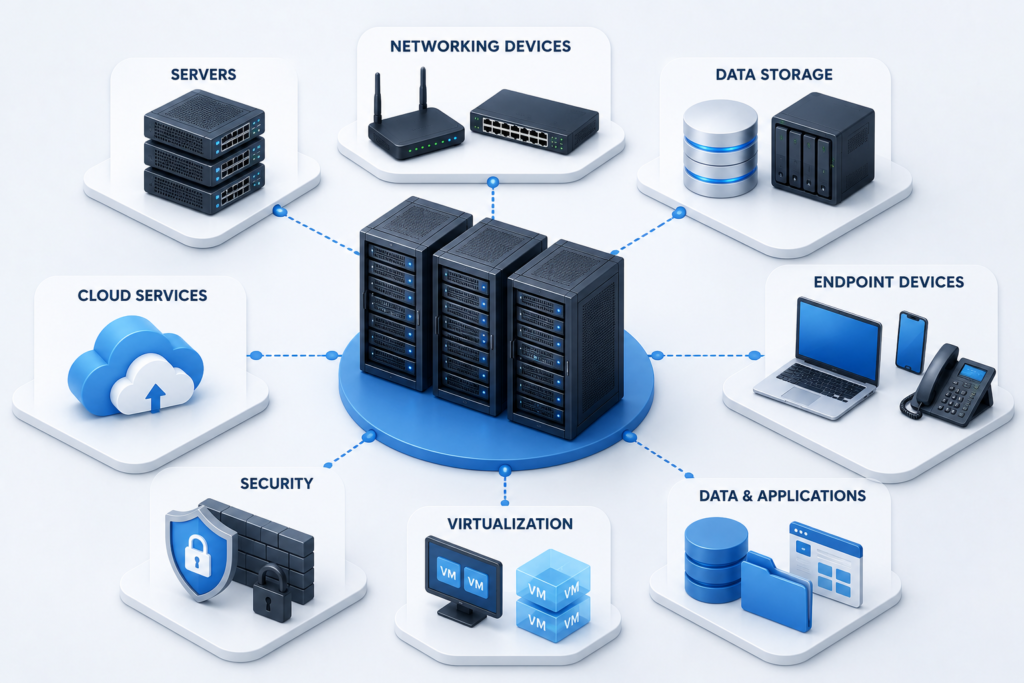
Main Components of IT Infrastructure

1. Hardware 

Hardware is a component concerned with the material components in an information technology (IT) environment. This would include desktops, laptops, servers, storage, printers, routers and switches. They are the cornerstone of an organisation’s technology framework. 

2. Software 

Defining Software: Refers to the software that are the programs or applications that workers use every day. These include business software, databases, productivity software, e-mail and systems software/firmware, including operating systems. The software is something that helps users to carry out tasks and business processes properly. 

3. Networking 

Networking is the process of linking devices, systems and users to the network throughout the organisation. She would have routers, switches, WAPs, and Internet connections for employees to communicate with each other, share files, and use the Internet. 

4. Data Storage 

The amount of data generated by businesses is vast and extensive every day. Storage infrastructure consists of hard drives, storage servers, and cloud-based storage solutions for securely storing and managing business data. It is also crucial to have backup systems to reduce data loss. 

5. Cloud Services 

Cloud Computing has become a part of today’s infrastructure. Cloud services are accessed applications, storage and computational power that provides flexibility, scalability, but no huge investment of on-premises application, storage or processing hardware. 

6. Security Systems 

Secure solutions safeguard business systems against cyber attacks. Sensitive information is protected, and your system remains secure by the use of firewalls, anti-virus applications, encryption and multi-factor authentication. 

Together they create a reliable IT environment that supports IT efficiency, productivity and organization growth. 

What Is IT Infrastructure Examples? 

Let’s have a look at some practical examples of IT infrastructure that will assist with understanding the concept. 

Example 1: Small Business Office 

A small office can be comprised of: 

  • Ten employee laptops 
  • A Wi-Fi network 
  • Cloud-based email services 
  • Cloud storage solutions 
  • Antivirus software 
  • A business printer 

These technologies collaborate with one another to make a business’s IT infrastructure. 

Example 2: E-Commerce Company 

These are some of the mechanisms which can be used in an online retail business: 

  1. Web servers 
  1. Cloud hosting platforms 
  1. Payment gateways 
  1. Customer databases 
  1. Inventory management software 
  1. Backup systems 
  1. Security monitoring tools 

All of these sections enable the customers to see the product, add the product to their shopping cart and make payments confidently and successfully. 

Example 3: Healthcare Organization 

IT infrastructure is relied upon by healthcare providers to: 

This will include  

  • Electronic health records (EHR) 
  • Secure patient databases 
  • Medical imaging systems 
  • Appointment scheduling software 

Example 4: Remote Workforce Environment: 

Now, there are a number of businesses starting to hire remote staff by providing: 

  1. Cloud collaboration tools 
  1. Virtual Private Networks (VPN). 
  1. Video conferencing platforms 
  1. Services like Cloud files sharing. 
  1. Endpoint security solutions 

Optimize Your IT Infrastructure with Pexo 

Pexo’s it Infrastructure Support Services offers a complete solutions approach to infrastructure to enable optimal system performance, reduce downtime and improve business continuity.  

Conclusion 

A digital era has emerged, and comprehending the role of IT infrastructure is crucial for any contemporary enterprise. The IT infrastructure is anything that is used in a business day-to-day such as hardware, software, networks, security systems, etcetera. 

By knowing the constituents of IT Infrastructure, organizations can create a reliable and scalable IT infrastructure. Another great benefit of learning examples of IT infrastructure is that it does not give the needy a hard time understanding the vital role of technology in other industries. The other good thing about studying IT infrastructure examples is that there is little effort on the part of the needy to try to understand the technology’s significance in other industries. 

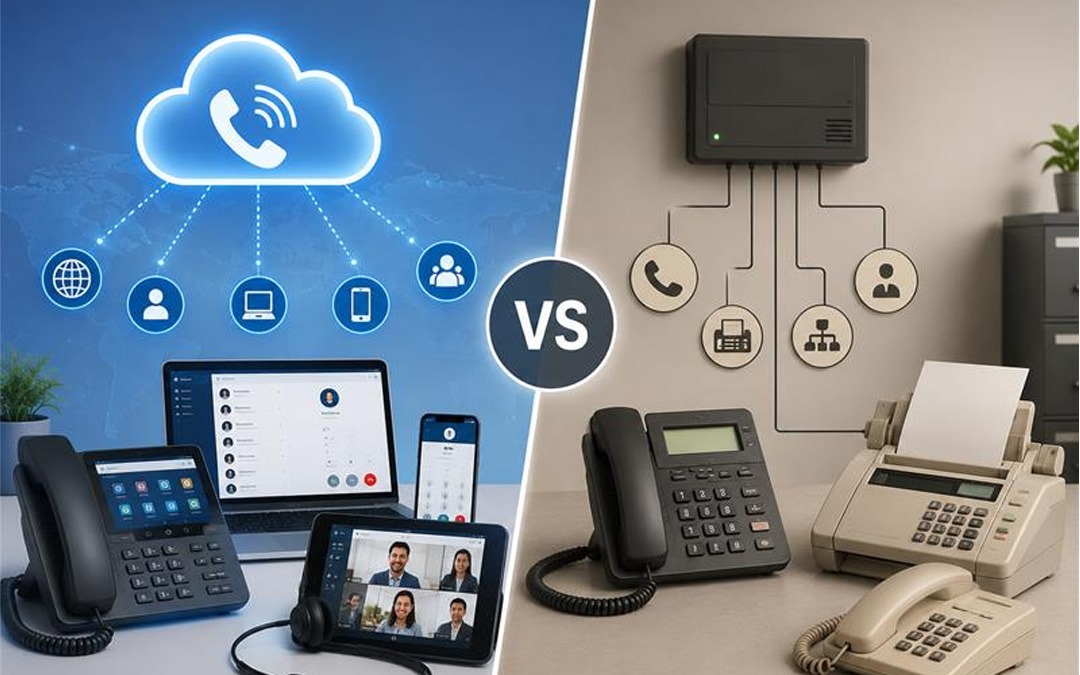
VoIP Phone System vs Traditional Phone System for Business  

Choosing the correct business phone system is essential for every business. Communication is key to the smooth functioning of teams and to happy customers. VoIP makes it an excellent alternative to traditional phone systems for businesses today, which is why it’s gaining popularity for this purpose. But some still use old landline phones since they are known to them and are reliable.  

What Does Traditional Phone System Mean? 

Traditional Phone System

A traditional phone system uses physical telephone lines to make and receive calls. These systems are dependent on the Public Switched Telephone Network (PSTN). Typically, companies have desk phones that are wired into the building via a telephone company’s copper lines.  

Traditional telephony systems have been in use for a long time. They have good voice quality, and are capable of but are often costly to set-up and maintain.  

What is VoIP Phone System? 

VoIP Phone System

VoIP is an acronym for Voice over Internet Protocol. It uses Internet to transmit Voice communications.  

Using desktop phones, computers, laptops, tablets, or smart phones, a VoIP System enables employees to dial and receive calls. Users can connect from virtually anywhere, as long as they have a reliable internet connection.  

With more features and lesser communication costs, many modern business organizations prefer VoIP communication.  

VoIP Phone System vs Traditional Phone System  

The table below compares the two options.  

Feature  VoIP Phone System  Traditional Phone System  
Connection  Internet  Telephone lines  
Installation  Simple and quick  Requires physical wiring  
Cost  Lower monthly costs  Higher installation and service costs  
Mobility  Use from anywhere with internet  Mostly office-based  
Scalability  Easy to add new users  Hardware upgrades often required  
Features  Video calls, voicemail to email, call forwarding, conferencing  Basic calling features  
Maintenance  Managed through software  Requires hardware maintenance  

Benefits of a VoIP Phone System  

VoIP enables several useful features for many business entities, and thus it is their preferred choice.  

Lower Communication Costs  

VoIP is Internet-based technology, rather than telephone-based. This can save on monthly phone bills, particularly companies that make long-distance or international calls.  

Easy to Scale  

It’s very easy to add additional users as your business expands, without having to install new phone lines.  

Work from Anywhere  

Employees can take business calls at home, while traveling or from other office locations. This is for supporting remote and hybrid working.  

Advanced Features  

The most valuable features in most any VoIP system are:  

  • Auto attendant  
  • Call forwarding  
  • Call recording  
  • Voicemail to email  
  • Video meetings  
  • Conference calling  
  • Mobile apps  

No additional equipment is required to facilitate these feature.  

Easy Management  

Most settings are changed on-line via a dashboard. Businesses do not need technicians for every small update.  

Benefits of a Traditional Phone System  

However, there are certain benefits in the traditional phone system.  

Reliable Call Quality  

Their voice quality is stable since they operate on assigned telephone lines, and is particularly good in areas where Internet service is not good.  

Familiar Technology  

Traditional phones are something many businesses have employed for years. They may already be in use and employees may not need any special training.  

Independent of Internet  

Traditional phone systems don’t depend on internet connection and they work even if it’s down.  

Which System is Cheaper? 

VoIP would most likely be the cheaper choice for most businesses.  

Traditional phone systems usually involve:  

  • Installation charges  
  • Wiring costs  
  • Hardware maintenance  
  • Higher call charges  

However, because of the use of an existing internet connection, VoIP cuts many of these costs.  

Which Businesses Should Choose VoIP? 

VoIP is a great choice for:  

  1. Small businesses  
  1. Growing companies  
  1. Remote teams  
  1. Multi-location businesses  
  1. Customer support teams  
  1. Businesses looking to reduce communication costs  

It lets employees connect from practically anywhere, but still maintain a level of professional communication.  

When is the Traditional Telephone System a Good Idea? 

You should consider a traditional phone system if:  

  • The Internet connection is unstable.  
  • All your business needs is basic calling.  
  • You already have an existing phone infrastructure that meets your needs.  
  • You experience an area with frequent Internet failures.  
     

Scalable VoIP Phone Solutions for Businesses of All Sizes 

When it comes to a new communication tool, Pexo’s VoIP Phone Service provides stable and scalable solutions for companies of any dimension. They own and provide services with VoIP that are advanced, have flexible plans, have high-quality voice calls and support remote workers or hybrid teams.   

Conclusion 

When comparing a VoIP phone system vs traditional phone system, VoIP is the better option for most modern businesses. It is more scalable, flexible, advanced features, lower cost. Most people can be connected almost anywhere, making it perfect for the work environment today.  

IT Infrastructure Explained: Projects, Services, and Management 

In today’s world and age, technology is crucial to a business. There is hardly any business activity without IT systems these days, it could be for storing data, or communicating with consumers. By utilizing a robust IT infrastructure, companies can enjoy a variety of advantages such as productivity, reduction in downtime, and secure operation. 

What is IT Infrastructure? 

What is IT Infrastructure

Understands the concept of IT infrastructure and all its technical elements in the IT environment of an organisation, including networks, hardware, software, data centres and components. It includes computers, servers, storage, cloud computers, operating systems and internet. 

What Are IT Infrastructure Projects? 

IT infrastructure projects are a set of projects that are planned for the improvement, implementation or upgrade of an organization’s IT systems. 

Some common IT infrastructure projects include: 

1. Server Upgrade Projects 

When businesses go out to buy new systems, it’s to address their issues with old servers, like enhanced speed, improved reliability, and added security. 

2. Cloud Migration Projects 

Even the majority of businesses can shift application and data on-premises to the cloud (such as Microsoft Azure, AWS or Google Cloud). 

3. Network Expansion Projects 

As businesses expand they could need more office connectivity, more office routers/switches or they might need an extra connection to their network. 

4. Data Center Modernization 

To achieve more efficient energy use, expand storage and improve performance, businesses take advantage of upgrades that can be implemented on their current data centers. 

5. Cybersecurity Implementation Projects 

Projects can involve the deployment of endpoint protection, multi-factor authentication and other security measures to ensure protection of the enterprises’ business information via firewalls. 

Planners need to carefully plan, budget, test, and support an IT infrastructure project to ensure its success. 

What Is IT Infrastructure Services? 

IT Infrastructure Services

IT infrastructure services are professional services which are used to enable business to construct, manage, organise and improve their IT infrastructure. 

Some services that IT infrastructure provides are: 

Network Management 

Providing surveillance and upkeep of the network, internet connections, and communication systems. 

Server Management 

IT teams provision, operate, and maintain physical and virtual servers that support the smooth operation of applications. 

Cloud Services 

Cloud infrastructure services are offerings like cloud migration, cloud monitoring, backup, and cloud security management. 

Data Backup & Disaster Recovery. 

Having regular backups and disaster recovery plans in place can help ensure that organizations can recover quickly in the event of an unexpected event, like a cyber-attack or hardware failure. 

Cybersecurity Services 

Security services include functionality making the threat monitoring, vulnerability assessment, firewall management and security updates. 

Help Desk and Technical Support 

IT support teams lighten the burden of their employees and fix any issues surrounding an IT environment related to hardware, software or connectivity. 

Pexo’s infrastructure solutions may be right for businesses looking for a reliable infrastructure support. The team can be easily depended on for proactive monitoring, server and network management, managing cloud services, cybersecurity support, and Disaster Recovery services to ensure the seamless and secure operations of organizations.  

What Is IT Infrastructure Management? 

IT infrastructure management is the process of monitoring, maintaining, and improving the organization’s IT resources. 

Typically, the following elements are part of IT infrastructure management: 

Monitoring IT Systems 

Continuous monitoring involves taking proactive steps to reduce the likelihood of the issues happening and limiting the effect on business operation if they do implement. 

Show how to correctly manage hardware and software systems. 

In addition to serving the IT Teams, Enterprise Application, Operating System and Storage Device can be maintained in the Servers. 

Security Management 

To have infrastructure managers in place with security solutions that protect systems from cyberattacks and unauthorized access. 

Capacity Planning 

In the post-pandemic business landscape, organizations will need to evaluate tech requirements to make decisions about infrastructure investments, with the end goal of meeting future technology demand. 

Performance Optimization 

System maintenance, software patching, and system tuning ensure that the performance is optimized and downtime is prevented. 

Backup and Recovery Management 

While backing up valuable business data, you’re ensuring that the valuable data can be recovered in an instant in case it is needed. 

By investing in good infrastructure management, organisations can reap a few benefits: 

  • Increased system reliability and uptime. 
  • Better cybersecurity protection. 
  • Increased employee productivity. 
  • Reduced operational costs. 
  • Faster issue resolution. 
  • Enhanced business continuity. 

Conclusion 

IT infrastructure boasts itself as the backbone for every business to run. The technology decisions should be based on a better understanding of IT infrastructure project/service needs and the processes that constitute IT infrastructure management. 

Productivity, security, and future growth can be enhanced with a doubling down on good infrastructure and management. 

5 Ways to Set Up Your Cloud IT Infrastructure 

In today’s world, businesses require flexible, secure and easily managed technology. Enterprise cloud IT infrastructure allows companies to store their data, run programs and allow workers to work anywhere. It also lowers hardware expenditure and eases growth as your company progresses. 

There must be planning for migrating to the cloud. The correct installation maximizes the performance, security and reliability. We will talk about the 5 most popular methods of setting up your cloud IT infrastructure. 

5 Smart Ways to Build Your Cloud IT Infrastructure 

Smart Cloud IT Infrastructure

1. Select the proper Cloud Model. 

The first step is selecting the type of cloud to fit your business. It could be done in three principal ways; 

● Public Cloud : It can be a cheaper alternative, although it will be sharing the cloud resources with other clients. 

● Private Cloud: It has resources that you can utilize solely to gain further security and control. 

● Hybrid Cloud: Dynamically combines Public and Private Cloud. 

The open cloud is a cheap option for small businesses. Enterprises with stringent security or compliance issues may have the best use of private or hybrid cloud. 

Cloud Model Best For Main Benefit 
Public Cloud Small and medium-sized businesses Low cost and easy to scale 
Private Cloud Businesses with strict security needs Greater control and enhanced security 
Hybrid Cloud Growing businesses with mixed workloads Flexibility to use both public and private environments 

2. Assess Your Existing IT Environment 

Evaluate the current IT environment prior to cloud migration. Determine the workloads, databases, and applications to migrate. 

Make inquiries like: 

  1. What business critical applications do you have? 
  1. What is the storage that you currently use? 
  1. What systems do you need high availability for? 
  1. Are there any applications that are outmoded and have to be removed? 

The correct assessment will prevent you from incurring any additional costs, and the moving steps will go more smoothly. 

3. Invest in Good Security from the Start 

Securing the environment is important and must be accounted for at the beginning of the process to move to the cloud. It’s critical to protect your business data. 

Some of the key security issues are: 

  • Employ multi-factor authentication (MFA) 
  • Encrypt sensitive data 
  • Identify proper password practices 
  • Keep software updated 
  • Set user access based on user job role 
  • Monitor clouds on a frequent basis. 

Further, with regular backups and disaster recovery plans, downtimes are minimized in case of unforeseen problems. 

4. Selection of trusted cloud solutions 

A cloud infrastructure is based on the services that you select. Search and find a solution that has good customer support, reliability, and scalability. 

Take into consideration the following aspects: 

  1. System uptime 
  1. Data backup options 
  1. Security certifications 
  1. Easily integrates with the existing software. 
  1. Technical support availability 
  1. Pricing and scalability in the future. 

By making the right decision to rely on the services of a trustworthy cloud, you will be able not only to run your business without any inconveniences but also to help your business develop in the future. 

5. Monitor, Optimise and Scale 

Building your cloud infrastructure is only one aspect. Active watchful waiting ensures your systems are maintained at an effective performance. 

Monitor key areas, such as: 

  • Server performance 
  • Storage usage 
  • Network traffic 
  • Cloud costs 
  • Security alerts 

As your business expands, add storage and computing capacity and new cloud-based services without having to purchase costly hardware. One of the major benefits of cloud infrastructure is this adaptability. 

Why Choose Pexo for Cloud Transformation? 

Cloud transition is not an easy path to undertake without the proper assistance. With minimal disruption, Pexo’s Cloud Transformation Service helps businesses plan, migrate and optimise their cloud environment. From upgrading to the latest technology to building a new cloud site from the ground up, Pexo provides solutions that can be customized to meet the needs of each business to improve their performance, security and efficiency.  

Advantages of a Well-Planned Cloud IT Infrastructure 

In the long term, a well-designed cloud infrastructure offers the following opportunities: 

  1. Lower the costs of IT infrastructure investments 
  1. Better business continuity 
  1. Improved data security 
  1. A user can log in remotely and easily. 
  1. Reduce deployment time for new applications 
  1. Scalability to adjust to different business requirements. 
  1. Reduce storage and maintenance of physical servers. 

These benefits empower organizations to invest more in building their businesses and less in IT maintenance. 

Conclusion 

Cloud IT infrastructure provides flexibility, security and performance that are required by today’s digital world. With the right cloud model, evaluation of current systems, enhanced security, reliable cloud services and constant evaluation of your environment, you can establish a cloud infrastructure that will set you up for success. 

Understanding RTO and RPO in Disaster Recovery: Definitions, Differences, and Examples

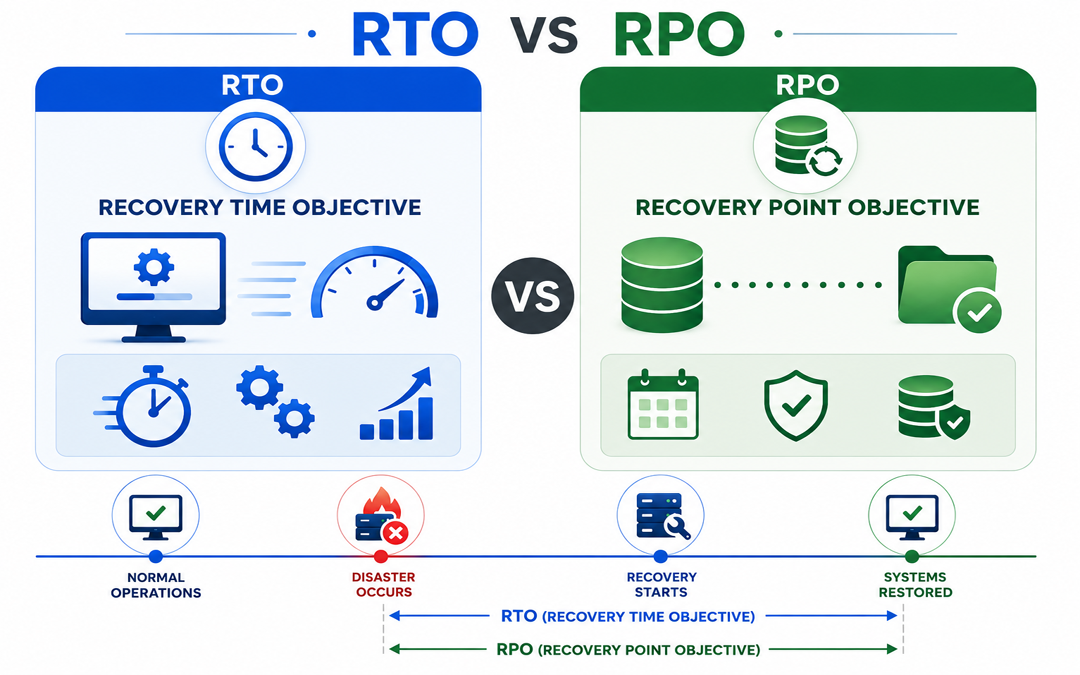
Recovery Point Objective (RPO) defines the maximum time that can be tolerated before a system is restored. RTO defines the architecture of the systems, the recovery strategy used and the frequency of backups.

Most disaster recovery exercises are conceptual. When a primary database server is down, it’s usually at a busy time. It’s important to know immediately how much data was lost and when operations will resume.

Most disaster recovery plans have only vague goals like “keep the business running”. The engineers must use concrete metrics to create a recovery plan that is effective.

These metrics will determine whether or not your application can recover smoothly from a data loss. It will be determined if your application is able to recover from data loss.

What is Recovery Point Objective?

RPO in Disaster Recovery

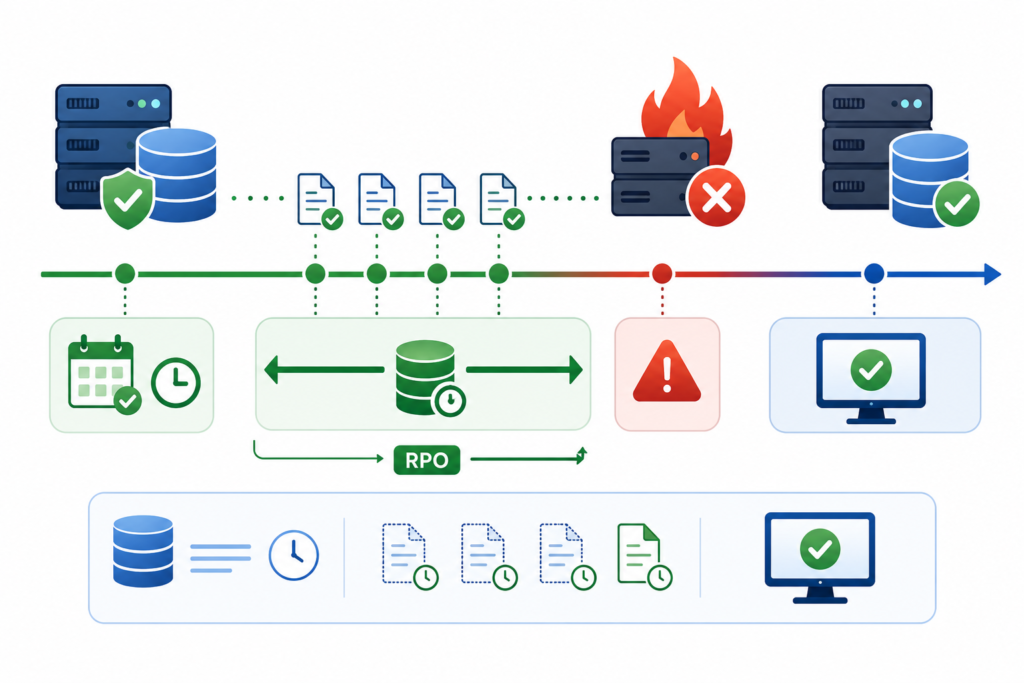
This is the time that has passed between a data loss and the latest backup.

It may seem simple to schedule backups, but the cost of storage and computing resources can be prohibitive.

RPOs less than 30 seconds are required by business-critical databases. To achieve more strict RPO goals, you must modify your architecture. This usually means using CDP or increasing the frequency of your incremental backups. Your system architecture needs to meet RPOs regardless of failure modes.

What is the Recovery Time Objective (HTM0)?

RTO in Disaster Recovery

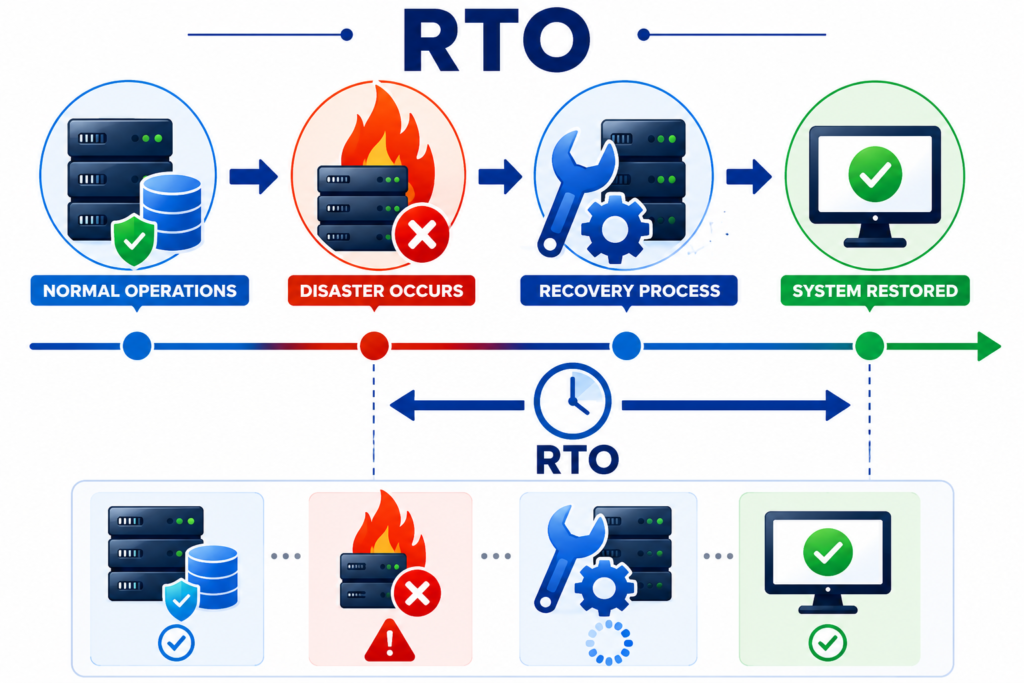
Recovery time objective measures how long an application can be down before it causes significant business damage. Time between the disaster and return to business as usual. Includes the time required to complete all the technical steps to restore data and applications.

Restoring from a backup in a staging environment appears quick. Moving Terabytes across a production network is not always scalable. Certain applications can remain offline for days without any significant impact. Payment APIs are only down for a short time before customers and revenue suffer.

You need high-performance hardware and orchestration software to improve RTO. Infrastructure that runs workloads off backup storage is also required.

What’s the difference between RTO and RPO

RPO looks backwards to the lost data. RTO is focused on downtime. RPO & RTO have different infrastructure designs despite their similarities.

In order to build a robust and reliable system, it is important that you understand these aspects of technology:

  • Measurement direction: Return to failure (RPO) is measured backwards in time. Calculation of RTO from failure time.
  • RTO is focused primarily on service continuity. HTML3_ HTML4_ HTML5_ HTML6_ HTML7_ HTML8_ HTML9_ HTML10_ HTML9_ HTML10_ HTML10_ HTML1?
  • Driver of architecture: RPO is responsible for determining your backup policies and frequency, including replication intervals. RTO drives your failover mechanisms, routing, and standby infrastructure.
  • Costs: The cost of replication is high, and it increases storage costs and bandwidth. A reduced RTO may increase computing costs due to the need for idle standby servers and failover systems.

These metrics measure your risk tolerance. They set goals for technology decisions.

How does RTO/RPO impact disaster recovery in the real world?

RTO and RPO can be viewed as separate metrics, which hides the complexity of recovery. A downed e-commerce website that customers access is an example of how these metrics interact during the downtime.

If you agreed on an RPO of one hour, your last clean backup must have taken place no earlier than one PM. Maximum data loss is one hour. You have up to six hours to determine the threat and restore the 1:00 PM back up to a new machine. Check data integrity. Update DNS records to direct traffic to the restored application.

Customers will leave you if your RTO is not met.

What is a realistic RTO/RPO target for engineers?

While it may seem ideal to aim for RPOs or RTOs that are zero, the infrastructure costs are enormous. Recovery goals should be realistic, based on budgets, available resources, and company priorities.

Grouping applications will help you allocate resources more efficiently. Disaster recovery can be focused on the most critical systems by grouping applications.

Tier 1 : Workloads deemed mission critical

The RTO target is usually minutes, or very close to it. the RPO goal can be between seconds and hours.
Second tier: This is needed for instant failover and continuous data replication. You will also need warm standby databases, which contain payment gateways and core production databases.

Tier 2: Business-important workloads

These systems can tolerate moderate downtime. The RTO goal is under four hours. The RPO target ranges between one and forty-eight hours.
Reduce loss without overloading the storage network. CRM and reporting tools are often found in this tier.

Tier 3: Standard workloads

The workload is lower in priority and a longer recovery period can be tolerated. Recovery time objectives range from 4 to 24 hours. Recovering times targets fall between 12 and 24-hours.
This is the first tier. It includes backups of standard data and employee training portals. Archived backups as well as archival storage are included in this level.

What is the best way to maximize RPO/RTO production?

Setting the goal is step one.

In order to meet production targets, it is important that your engineering team follows specific architectural patterns.

  • Do frequent incremental backups. This is simple. Your RPO will decrease if you make more frequent backups. Incremental backups reduce the storage requirement by only storing changes.
  • Use a warm standby database. This will ensure that you have minimal data loss and a fast recovery. For example, by using physical replicas to maintain your standby, it is possible to fail over in just minutes. Both RTO and RPO can be achieved simultaneously.
  • Store immutable data offsite. Avoid modifying or deleting critical recovery information. Immutable backups ensure that you can recover in the event of a primary network compromise.
  • Use automation scripts to automate the failover process. Manual recovery can introduce human error, increasing downtime. Automate restarting services and database promotion using automation scripts.
  • Document all the dependencies of your applications. Prioritize recovery. Restore authentication services, databases and webfrontends before restoring any other functionality.

What’s the best way for you to test your Disaster Recovery Infrastructure?

Many companies think that they have perfect backups. However, when the company tries to restore their database, the backups turn out to be corrupted. The theoretical goals of recovery are useless if the restore actually fails.

Regularly test your recovery procedures. A complete outage is an effective way to assess your infrastructure. Calculate the amount of time required to return the work to its functional state. Compare this measurement with your Recovery Time Objective (RTO) to see how the actual world compares to what you defined.

Check your recovery points to ensure that you are not exceeding the RPO. You cannot have an RTO of less than two hours when it takes six hours to download your cloud backups. Upgrade to a local backup server or upgrade your network.

What is the RTO/RPO requirement for your Disaster Recovery Plan?

You and your team might have agreed that your RTO for a critical database should be 15 minutes. This timeframe must include the database and any dependent systems.

When evaluating vendors, ask for proof. Physical replication is used to continuously verify backup databases. The Dbvisit Standby for Oracle Database Tools use this method to ensure a backup database that’s ready to be taken over by production traffic.

Make sure that your backup solution is meeting all of your needs without impacting the performance of primary databases. Ensure that you have minimal gaps in between backup and primary environments by updating source databases continuously.

Plan your disaster recovery before production fails

A discipline based on metrics, disaster recovery is an engineering discipline. The RTO (Reduced Time Objective) defines the maximum amount of downtime your business can tolerate before operations are significantly impacted. Set your metrics today to make sure your system survives tomorrow.

PEXO Helps Businesses Recover Faster with Advanced Backup Solutions

Protect your critical business data with reliable Data Backup and Disaster Recovery Services. PEXO helps organizations minimize downtime, safeguard essential information, and ensure business continuity through proactive backup strategies and rapid recovery solutions. Their expert team delivers secure, scalable solutions designed to keep your operations running smoothly, even during unexpected disruptions.

Real-World Example of RTO and RPO

Consider an online banking platform:

·         RTO: 1 hour

·         RPO: 15 minutes

If the system fails at 3:00 PM:

·         The bank must restore services by 4:00 PM.

·         The bank can afford to lose only up to 15 minutes of transaction data.

To achieve this, the organization may use real-time replication, frequent backups, and automated failover systems.

FAQs

What is RTO and how does it measure up?

Recovery Time Objective is It is the maximum time that your system can be off-line following a disruption. Calculated from the point at which the problem occurred to the point when normal operations resume.

What is RPO and how does it work?

RPO stands for Recovery Point Objective. RPO represents the recovery point goal. RPO is the Recovery Point Objective.

How does backup frequency affect my RPO rate?

RPO directly depends on the frequency at which you back up. If you do so every four hours, your RPO will equal four hours. Data loss occurs for four hours if there is a failure right before a backup run.

Why do companies use warm standby databases for disaster recovery?

RTO/RPO is drastically reduced with warm standby database. Data loss from the primary database can be kept at a minimum. Servers will still run and failover can happen in minutes rather than hours

How frequently should engineers check RTO/RPO goals?

Teams should review their RTO/RPO goals at least once a quarter. This metric must be evaluated whenever there are changes in compliance standards, new workloads, or if the business is growing significantly.

Immutable Backups: Meaning, How They Work, and Examples

Data loss can occur in a flash, whether from ransomware attacks, accidental deletions, hardware failures, or insider threats. While traditional backups remain an indispensable part of any backup strategy, cybercriminals have been onto the traditional backup strategy and have been increasingly targeting backup systems and other IT components that can be dual-routed to a single point of failure. This is where immutable backups come into place as part of modern disks, cybersecurity, and disaster recovery requirements.

In this guide, we’ll unpack what immutable backups mean, how immutable backups work, and answer the question: What is a real-life example of an immutable backup?

What Do Immutable Backups Mean?

Immutable Backups Mean

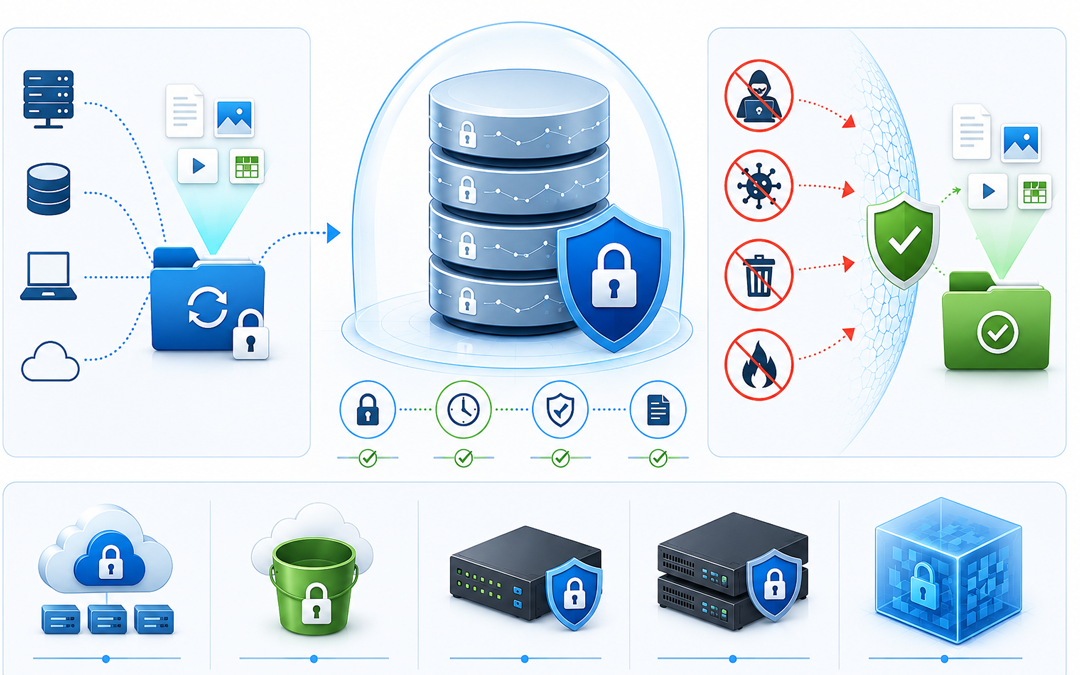
The term immutable backup means one that cannot be modified, deleted, or overwritten for a specific retention period. Once the data has been written to the backup, it is considered “read only” until the specified time has elapsed.

In other words, immutable backups are basically a snapshot of the data that cannot be touched, no matter what the cyberattacks, human error, or any other factor.

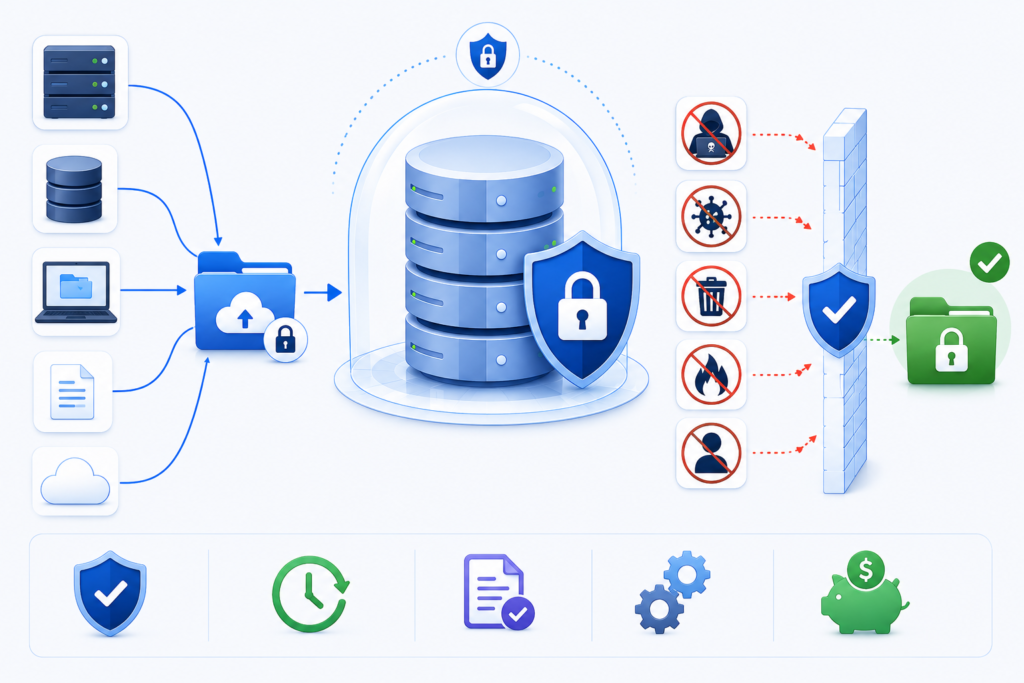
This is where the extra layer of protection comes in because if a cyberattacker has infected your IT systems, they cannot modify or delete immutable backup files.

How Do Immutable Backups Work?

When you back up data to an immutable storage environment, you’ll apply a Write Once, Read Many (WORM) policy. With this policy in place, the data can be written once, but not altered or deleted until the retention period expires.

Below is a typical sequence of events:

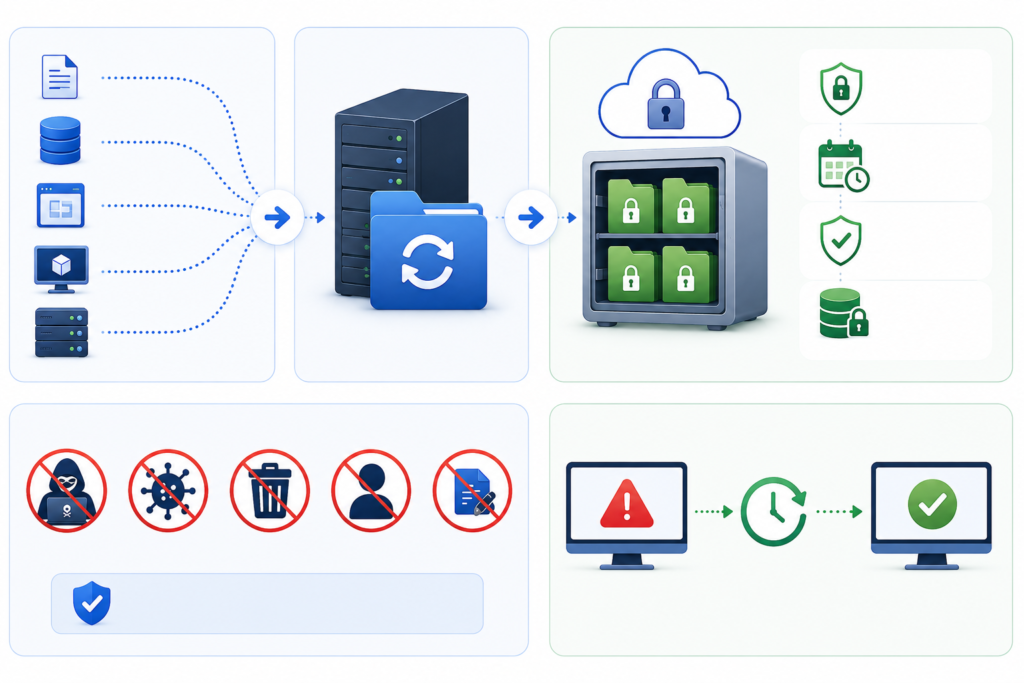
Data Is Backed Up

A backup platform copies files, databases, applications, or entire systems to a backup repository based on a backup plan.

Immutability Policies Are Set

The backup platform locks newly created backup files based on one or more retention policies.

Changes Are Restricted

No user can change or delete the backup data during the retention period.

Recovery Remains Available

The backup cannot be edited, but accredited individuals may retrieve it to restore the database as many times as required.

The Data Retains Expires

When the retention period ends, the organization can either delete the backup data or start locking it again.

This approach ensures that you’ll always have a clean, uncorrupted copy of your data.

What Is An Example of An Immutable Backup?

Example of An Immutable Backup

“What is an example of an immutable backup?” is a question many organizations ask.

One example of that is a business that uses cloud object storage with object lock capabilities.

Consider that:

  1. A business backs up its financial data on a daily basis.
  2. These backups reside in an immutable cloud storage repository.
  3. The business moves to a 90-day retention policy.
  4. If ransomware infects the production servers and attempts to delete the backup files, the immutable copies are safe.
  5. The IT staff recovers the systems from the protected copies.

Backup appliances with WORM capability can also lock snapshot images against changes.

Having immutable backups is only the beginning of a comprehensive business continuity plan. Businesses also require the expertise of a professional who can also monitor and promptly initiate quick recovery actions, through appropriate solutions, to reduce costs and eliminate the impacts of unexpected events on their organization.

Protect, Recover, and Thrive with Pexo’s Data Backup Services

Pexo’s Data Backup and Disaster Recovery services enable businesses to secure vital data, by creating secure backup solutions, quick recovery options, and customized disaster recovery planning. Whether you’re building protection against ransomware attacks or preparing for a solid business continuity solution, Pexo provides the right solutions to keep your business running at all times.

Final Thoughts

Companies are increasingly aware of what immutable backup data means. These backups provide powerful protection by ensuring there is no possibility of the critical recovery data being modified or deleted during a predefined period.

By applying the building blocks of immutable backups in practice, companies will be better positioned to protect themselves from ransomware and human error, as well as system failures. Cloud object lock solutions, WORM-enabled storage systems and other options provide several examples of immutable backups that can help businesses secure their most valuable asset: their data.

Choosing to invest in immutable backup technology now means that companies can equip themselves with a way to weather the storm when disaster strikes tomorrow.