Bell Canada Data Breach: 5 Best Steps for Businesses
Bell Canada Data Breach: 5 Best Steps for Businesses
On November 17, 2026, an unknown party gained access to an internal Bell system that held customer personal information. Bell has confirmed the Bell Canada data breach affected both residential and business customers, and it is contacting affected customers directly.
No credit card or bank account details were taken, according to Bell. But the information that was taken is exactly what scammers need to send convincing fake messages, and it lands just days before Black Friday, when inboxes are already full of order and delivery emails.
Here is what happened, and five steps your business should take now.
What the Bell Canada Data Breach Exposed
According to Bell’s own notice, the affected information may include:
Name or contact name, mailing address, phone numbers and email address
Account number and business name (if applicable)
Product information
The date and amount of your last payment
The Canadian Press reported that customers of Bell, Bell Aliant, Bell MTS, Virgin Plus and Lucky Mobile were affected. Bell has not said how many.
For enterprise customers, Bell told CBC News that one of the systems accessed was used for ordering and supplying telecommunication networks. Business contact details, including names, corporate email addresses, phone numbers and some IP addresses, were stolen. Bell said files and PDFs were not affected.
Bell described the attacker as “agentic”, a word usually used for AI tools that carry out tasks on their own. Bell has not explained what it meant, and it says it does not yet know who was behind the attack. It has contacted the RCMP’s cybercrime unit and shared technical indicators with enterprise customers and the Canadian Centre for Cyber Security.
Why the Bell Canada Data Breach Still Matters
It is tempting to relax when a company says no financial data was taken. That is a mistake.
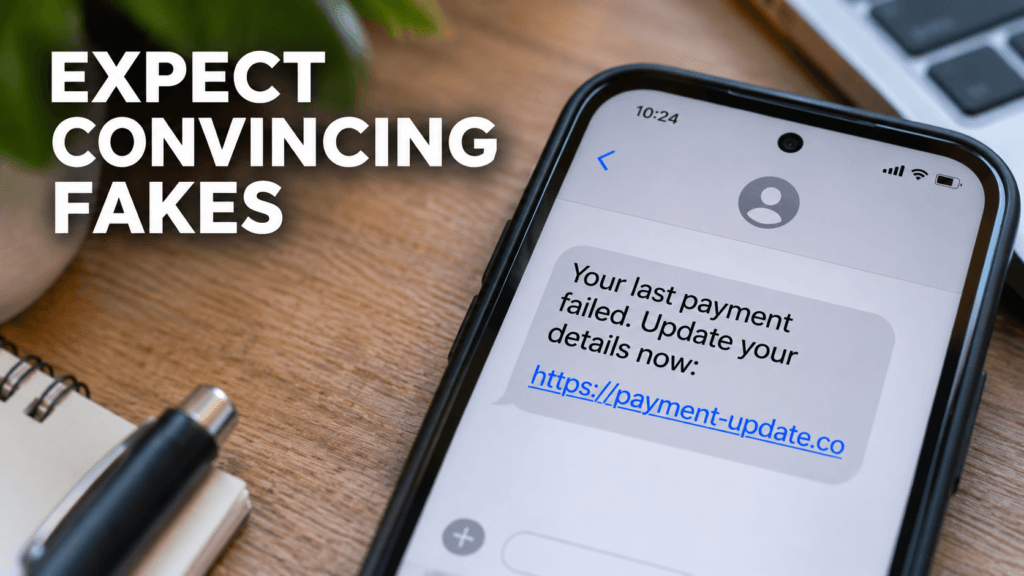
A scammer who knows your name, your account number, what you pay for and the amount of your last payment can write an email or make a call that sounds exactly like Bell. “Your last payment of $186.40 failed, please update your details” is far more convincing than a generic phishing email. Our guide to ClickFix attacks shows how quickly a convincing message turns into a real compromise.
5 Best Steps for Businesses After the Bell Data Breach
1. Warn your team today
Send a short message about the Bell Canada data breach to everyone who handles phone, internet or billing accounts. Any call, email or text that claims to be from Bell should be treated as unverified until checked. Bell says it will never contact you to ask for bank account information, passwords or PINs.
2. Verify through a number you already trust
If someone “from Bell” asks for details or payment, hang up and call back using the number on your bill or in your MyBell account, not one given in the message. The same rule applies to texts and emails: open your account directly rather than clicking a link.
3. Check every invoice and payment change
Because the Bell Canada data breach included the date and amount of last payments, expect fake overdue notices and “updated banking details” requests. Confirm any change to how or where you pay by phone with someone you know. Ask your account representative whether extra verification can be added for changes such as SIM swaps and number transfers.
4. Review your network if you are an enterprise customer
If Bell provides your circuits and you received its notice, some IP addresses tied to your network may be in the stolen data. Ask Bell for the indicators of compromise it has shared, check your firewall and remote access logs, and make sure internet-facing devices are fully patched.
5. Make strong logins and reporting the default
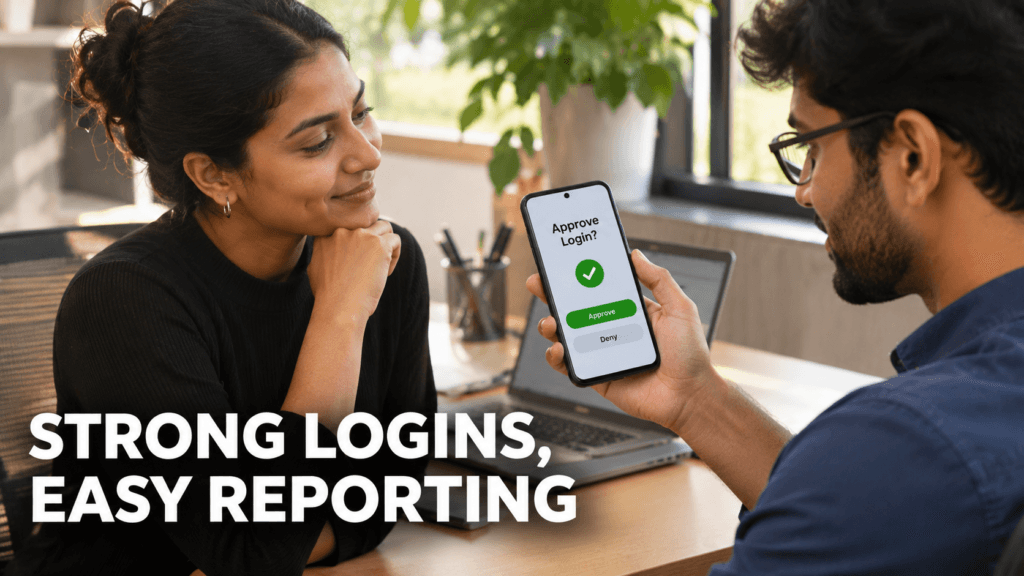
Turn on multi-factor authentication for email, MyBell and any business portal. Then make it easy for staff to report a suspicious message without feeling foolish, as we covered in our Cyber Security Awareness Month habits. One early report can stop a scam before money moves.
What to Do If You Think You Were Targeted
If someone on your team shared information or made a payment after a fake Bell message, act quickly:
Contact your bank and Bell directly using trusted numbers
The Bell Canada data breach is a reminder that stolen contact details are often the first step in a bigger scam, not the end of the story. A short warning to staff, a call-back rule and a careful look at payment requests will stop most follow-up attempts.
If you want help reviewing your cyber security or setting up multi-factor authentication across your team, we support small businesses across Markham and the GTA. Contact us to talk it through.
In the digital age, data is the lifeblood of businesses. It fuels operations, decision-making, and customer interactions. But there is a dark underbelly of this data-centric landscape. It’s the persistent threat of data breaches. The repercussions of a data breach extend far beyond the immediate aftermath. They often haunt businesses for years. Only 51% of data breach costs occur within the first year of an incident. The other 49% happen in year two and beyond. Image source: IBM’s Cost of a Data Breach Report 2023 We’ll take a look at the long-term consequences of a data breach. As well as examine a real-world example. You’ll see how a single breach can have enduring implications. Ones that impact a business’s reputation, finances, and regulatory standing. The Unseen Costs of a Data Breach Introduction to the First American Title Insurance Co. Case The 2019 cybersecurity breach at First American serves as a stark illustration. It reminds us of the far-reaching consequences of a data breach. In this case, the New York Department of Financial Services (NYDFS) imposed a $1 million fine. Cybersecurity sites announced the fine in the fall of 2023. The company’s fine was for failing to safeguard sensitive consumer information. The breach exposed over 880 million documents. These files contained personal and financial data. The breach represented a significant violation of data protection standards. This is one example of how costs can come long after an initial breach. Here are some other ways security incidents can haunt businesses for years. Lingering Impacts of a Data Breach Financial Repercussions The financial toll of a data breach is significant. Immediate costs include things like: Breach detection Containment Customer notification Beyond those, businesses face long-term expenses. These relate to legal battles, regulatory fines, and reparations. Regulatory penalties are just one facet of the financial repercussions. Others include potential legal actions from affected individuals, as well as class-action lawsuits adding to the monetary strain. Reputation Damage The impact on a business’s reputation is arguably the most enduring consequence. Customers lose trust in a company’s ability to protect their sensitive information. This loss of trust can result in a decline in customer retention, acquisition difficulties, and long-lasting damage to the brand image. Rebuilding a tarnished reputation takes time and concerted efforts. These may involve public relations campaigns and enhanced security measures to assure stakeholders of renewed commitment to data protection. Regulatory Scrutiny Regulatory bodies increasingly hold businesses accountable for safeguarding consumer data. A data breach triggers regulatory scrutiny, which may lead to fines and ongoing compliance requirements. Regulatory authorities take a stringent stance on data security and on companies that fail to meet cybersecurity standards. The fallout includes financial penalties, increased oversight, and mandatory security improvements. Operational Disruption The aftermath of a data breach disrupts normal business operations. Companies must take remediation efforts and implement enhanced security measures, which can divert resources away from core business functions. The company feels the impact across departments, affecting productivity and efficiency. The ripple effect of operational disruption can extend for years, impeding growth and hindering the organization’s ability to adapt to market changes. Customer Churn and Acquisition Challenges A data breach often leads to customer churn as individuals lose confidence in the business’s ability to protect their data. Acquiring new customers becomes challenging, as potential clients are wary of associating with a brand that has suffered a breach. The prolonged effects on customer acquisition can hinder the company’s growth and market competitiveness. A Cautionary Tale for Businesses Everywhere The repercussions of a data breach extend far beyond the immediate incident. They can impact the financial health, reputation, and regulatory standing of a business for years. As the frequency and sophistication of cyber threats continue to rise, proactive cybersecurity measures are not just a necessity. They are a strategic imperative for safeguarding the long-term success of businesses. The true cost of a data breach is not always immediately evident. It’s a complex interplay of financial penalties, reputation damage, regulatory consequences, and operational disruption. These impacts can persist for years. It’s important to learn from real-world examples and focus on robust cybersecurity measures to mitigate the risks associated with data breaches, safeguarding both immediate interests and long-term viability. Need a Cybersecurity Assessment to Prevent an Unexpected Breach? There are many ways that hackers can breach a network. From endpoints to cloud tools, you must run a tight security ship. Need some help? Schedule a cybersecurity assessment today. This is the first positive step into understanding and addressing your risk, as well as avoiding the consequences of a data breach. Give us a call today to schedule a chat. Table of Content 1 The Unseen Costs of a Data Breach 2 Lingering Impacts of a Data Breach 2.1 Financial Repercussions 2.2 Reputation Damage 2.3 Regulatory Scrutiny 2.4 Operational Disruption 2.5 Customer Churn and Acquisition Challenges 3 A Cautionary Tale for Businesses Everywhere 4 Need a Cybersecurity Assessment to Prevent an Unexpected Breach?
In today’s digital world, technology is integral to our everyday lives. People use it for banking, communication, shopping, the Storage of Critical Data, etc. These technologies, though, can be a source of vulnerability and opportunity for the cybercriminal. Cyber attacks are a growing threat to medium, small, and large businesses across every sector. What is a Cyber Attack? A cyber attack is an intentional act of hackers or cybercriminals used to gain access to a computer system, network, or information system without the permission of the owner. Cyber-attacks attempt to steal information, damage, or even shut down a computer system. Cyber attacks take many forms that entail the following: How Does a Cyber Attack Happen? If you know the way in which the attacks are made, it will provide a good opportunity for the organizations to enhance their habitudes so that they can be as secure as possible and minimalizing the risks to be caught up in the cyber attacks. Phishing Emails Phishing is still one of the main ways in which criminals fool people. Cybercriminals will send very deceptive emails that are faked to look like those from well-known companies or from people you might trust. Weak Passwords Using the same weak password over and over again makes it easier for hackers to gain access to your accounts. Cybercriminals can guess passwords using automated tools and will then try to get access to your system or application without your permission. Malware and Ransomware Malware refers to any kind of malicious software that is designed to cause harm to a computer or to steal data. Ransomware is a form of malware whereby files or systems are locked until a ransom is paid. In most cases, a user is duped into downloading malware or is sent a suspicious attachment. Software Vulnerabilities Cyber attackers are known to exploit security loopholes in old software or operating systems. If an organization fails to apply security patches or install updated versions of their software, then it is as if to invite the hackers who are capable of using these vulnerabilities to break into their networks without authorization. Unsafe Public Wi-Fi You should not even consider using an unsecured public Wi-Fi as it is extremely easy for a cybercriminal to attack you. Their actions may even consist of observing your Internet traffic and, at the same time, stealing your passwords, bank account information, or other types of sensitive data that you may be sending while you are still on an unprotected connection. How to Avoid a Cyber Attack? Be sure to create a strong password Make your passwords longer and more complicated by combining letters, numbers, and different symbols. Avoid using the same password for different accounts. Also, use multi-factor authentication whenever it is available. Keep Software Updated You should upgrade your computer’s operating system as well as your apps and anti-virus program quite often. This way, vulnerabilities will not only be patched, but also the level of protection will be raised to counter new threats. Train Employees Human error accounts for a significant portion of cyberattacks. Companies need to offer training to their staff members on how to spot phishing emails, handle suspicious messages, and perform online activities safely to lessen the vulnerability to such attacks. Install Reliable Security Software Antivirus software, firewalls, and endpoint security solutions form the first line of defense by detecting and preventing the running of malicious code that the attackers use to harm your computers. Backup Important Data By backing up data, businesses, are able to survive the aftermath of a ransomware attack or any incident of data loss. They must keep the backup copies in safe locations and carry out their verification regularly and thoroughly. Avoid Suspicious Links and Attachments Generally, interacting with strange links, downloading files from untrusted sources, or even opening suspicious mail attachments should be completely avoided by users. One of the security habits is to always check the sender’s credibility before replying to emails. Nowadays, companies are exposed to numerous cyber threats that call for sophisticated protection measures together with regular surveillance. Pexo offers extensive cybersecurity services to help enterprises recognize threats, prevent attacks, and protect sensitive information. Conclusion To sum up, hacking is a very serious issue in the tech world that not only harms individuals but businesses too. Knowing what hacking is, in case it is perpetrated, and effective ways to stop it are among the factors that can greatly minimize one’s exposure to data theft and monetary fraud. Table of Content 1 What is a Cyber Attack? 2 How Does a Cyber Attack Happen? 3 How to Avoid a Cyber Attack? 4 Conclusion
The most useful questions to ask your MSP right now have nothing to do with your own network. They are about the tools your provider uses to reach into it. On September 11, 2026, the U.S. Cybersecurity and Infrastructure Security Agency added a critical ConnectWise ScreenConnect vulnerability to its Known Exploited Vulnerabilities catalog after confirming that attackers were already using it in real attacks. ScreenConnect is one of the most widely used remote support platforms in the managed services industry, which means the story is not really about one product. It is about a category of tools that sit at the center of how nearly every managed IT provider reaches into a client’s network. For a small or mid-sized business, the useful takeaway is not which specific vulnerability appeared this week. It is a short set of questions to ask your MSP so you understand how they secure the tools they use to reach you. What Actually Happened With ScreenConnect? The flaw, tracked as CVE-2026-84869, is an improper privilege management and missing authorization issue. In practical terms, it could allow an attacker to transfer files to a device and execute them during an active remote support session without the host user ever approving the action. CISA set a remediation deadline of September 14, 2026, for federal agencies covered by Binding Operational Directive 26-04, and the same urgency applies to any organization running the affected version. The specific patch was straightforward for providers who noticed. The harder question sits one level up: how confident is your provider in their ability to spot, patch, and respond to something like this on their own infrastructure, not just on yours? Why This Matters for Small Businesses? Managed service providers are built on trust and access. A single provider often holds administrative reach into dozens or hundreds of client environments using remote support tools, remote monitoring platforms, and centralized password vaults. That concentration of access is efficient for delivery, and it is also exactly why attackers have been aiming at the provider layer rather than at each client individually. According to the Huntress 2026 Cyber Threat Report, abuse of remote monitoring and management tools now accounts for 24% of all observed incidents, up from 7% the year before. Huntress’s own analysis flagged ScreenConnect specifically, including one case where a rogue install sat quietly for five months before an attacker used it as an entry point. The ScreenConnect entry in the KEV catalog is not an isolated event. It is the latest example of a documented, ongoing trend, and it is why the cybersecurity posture of your provider now matters as much as your own, which is exactly why the questions to ask your MSP have shifted this year. 5 Questions to Ask Your MSP If you already have a managed IT provider, or you are evaluating one, these are the questions to ask your MSP directly. Good providers will have clear, unrehearsed answers. 1. How quickly do you patch the tools you use to reach my network? Ask about their patch cadence for their own infrastructure, not just yours. A provider running weekly patch cycles internally is in a very different position than one that treats their tools as “set and forget.” Our September Patch Tuesday breakdown shows how quickly critical fixes can pile up in a single month. 2. What monitoring do you have on your own remote sessions? Session logging, anomaly detection, and alerting on unusual remote access patterns should all exist on the provider side. If they cannot describe what triggers an alert on their own systems, that is a signal worth paying attention to. 3. Do you enforce multi-factor authentication on every tool that reaches my environment? Every account, every technician, every tool. Not “we use MFA on email.” MFA on the remote support platform, on the RMM console, on the password vault, and on any cloud dashboard that touches client data. Enterprise-grade password managers make this practical to enforce at scale. 4. What is your response plan if one of your own accounts is compromised? The right answer is not “that would not happen.” The right answer is a specific set of steps: session revocation, credential rotation, client notification timelines, and a documented containment playbook. This should also connect back to whatever cybersecurity insurance obligations exist on either side. 5. Are you aligned to a recognized security framework internally, not just for compliance reporting? Frameworks like the NIST Cybersecurity Framework 2.0 and the CIS Controls exist for exactly this reason. A provider who applies these internally, not only when a client asks about compliance, is thinking about their own posture the same way they think about yours. What to Do Next? If you already have a managed IT provider, send these five questions in a short message and see how they respond. The quality of the answer matters as much as the content: unrehearsed and specific beats polished and vague every time. If you are weighing options, bring these questions to ask your MSP into the conversation before you sign anything. A provider who treats these questions as reasonable and expected is showing you how they operate. One who deflects is also telling you something. At Pexo, security posture starts with the tools we use before it reaches the networks we protect. If you are evaluating your options, our managed IT services team is happy to walk you through exactly how we answer each of these questions for our own environment. Table of Content 1 What Actually Happened With ScreenConnect? 2 Why This Matters for Small Businesses? 3 5 Questions to Ask Your MSP 3.1 1. How quickly do you patch the tools you use to reach my network? 3.2 2. What monitoring do you have on your own remote sessions? 3.3 3. Do you enforce multi-factor authentication on every tool that reaches my environment? 3.4 4. What is your response plan if one of your own accounts is compromised? 3.5 5. Are you aligned to a recognized security
Monil Saheba, Pexo's CEO, shapes business resilience through technology. He leads teams redefining IT with strategic support and cybersecurity, empowering organizations to harness technology for innovation and success.